
Exam Eligibility Calculator. Check Age and Attempts Fast
An exam eligibility calculator helps you check if you meet the basic rules required to apply for an exam. These rules usually include age limits, education level, category relaxation, and attempt limits. Instead of guessing your eligibility, you can calculate it instantly.
First, choose an exam such as UPSC Civil Services, NDA, CDS, or Defence. Then enter your date of birth, exam year, category, attempts used, and education status. The calculator finds your exact age on the official cutoff date. After that, it checks if your age fits the allowed range.
The result shows if you are eligible, not eligible, or eligible in a future year. It also explains the reason and shows a five-year eligibility runway so you can plan your exam attempts.
Quick Facts
- Exam presets: UPSC Civil Services, NDA, CDS, Defence
- Custom exam mode: Set minimum age, maximum age, attempts allowed, and cutoff date
- Key outputs: Eligibility verdict, age check, attempts check, explanation, and 5-year eligibility runway
- Eligibility factors: Age on cutoff date, category relaxation, education status, and attempts used
- Updated Mar 5, 2026
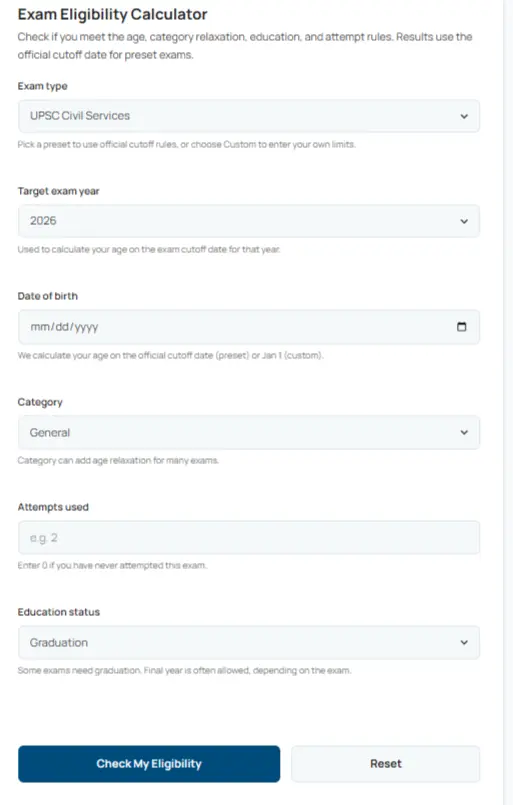
Exam Eligibility Calculator
Check if you meet the age, category relaxation, education, and attempt rules. Results use the official cutoff date for preset exams.
Pick a preset to use official cutoff rules, or choose Custom to enter your own limits.
Used to calculate your age on the exam cutoff date for that year.
We calculate your age on the official cutoff date (preset) or Jan 1 (custom).
Category can add age relaxation for many exams.
Enter 0 if you have never attempted this exam.
Some exams need graduation. Final year is often allowed, depending on the exam.
Most official exams use a cutoff date. Use this only if you know it.
Why this result
—
Age check
- Age on cutoff date
- —
- Minimum age
- —
- Maximum age (after relaxation)
- —
- Time until age-out
- —
Attempts check
- Attempts used
- —
- Attempts allowed
- —
- Attempts remaining
- —
Eligibility runway (next 5 years)
What This Exam Eligibility Calculator Checks
The Exam Eligibility Calculator helps you confirm if you meet the basic rules required to apply for an exam. These rules usually include age limits, education requirements, category relaxation, and attempt limits.
First, select the exam you want to check. Then enter your date of birth, the target exam year, and your education status. You can also add how many times you already attempted the exam. After that, click Check My Eligibility. The calculator analyzes your details and shows your result instantly.
This exam eligibility check tool helps you avoid mistakes before submitting an exam application.
Expected Inputs
Users must enter the following information.
Exam type
- UPSC Civil Services
- NDA
- CDS
- Defence (Generic)
- Custom Exam
Each preset exam uses its own official age rules and cutoff date.
Target exam year
Select the year you plan to take the exam. The calculator uses this year to determine your age on the official cutoff date.
Date of birth
Enter your DOB exactly as written on official documents.
Category
- General
- OBC
- SC/ST
- Defence
- Disabled
Some categories receive age relaxation, which increases the maximum age allowed.
Attempts used
Enter how many times you already attempted the exam. If you never attempted the exam, enter 0.
Education status
Choose your highest completed education level:
- High School
- Graduation
- Final Year Graduation
- Post Graduation
Some exams require graduation or final year graduation.
Custom Exam Mode
If you choose Custom Exam, the calculator allows you to define your own rules.
- You can enter:
- Minimum age
- Maximum age
- Attempts allowed (optional)
- Custom cutoff date
This option helps you test eligibility rules for professional exams, certifications, or recruitment exams.
Output Fields (Results You Will See)
After submitting your details, the calculator shows several results.
Eligibility verdict
The tool displays one of three results.
- Eligible
- Not Eligible
- Eligible in a future year
Why this result
A short explanation describes which rule affected your eligibility.
Age check
Shows:
- Age on the cutoff date
- Minimum age requirement
- Maximum age after category relaxation
- Time remaining before age-out
Attempts check
Displays:
- Attempts used
- Attempts allowed
- Attempts remaining
Eligibility runway
A visual timeline shows your eligibility status for the next five years. This helps you plan future attempts and exam preparation.
What the Calculator Helps You Avoid
Many candidates get rejected because they apply when they are underage, overage, or missing qualifications. This exam eligibility calculator prevents that mistake by checking your eligibility before you apply. Once you confirm your eligibility, you can confidently proceed with your exam preparation.
Explore More Calculators
Check your attendance percentage fast. Enter classes held, attended, and your goal to see how many more you need to reach 75%–90%. Instant, accurate,…
Try calculatorUse this 75 percent attendance calculator to check your attendance and see how many classes you must attend to reach the 75% attendance rule.
Try calculatorUse the 85 Percent Attendance Calculator to check your current percentage, classes needed to reach 85%, projected attendance, and how many classes you can…
Try calculatorWhat Your Exam Eligibility Result Means
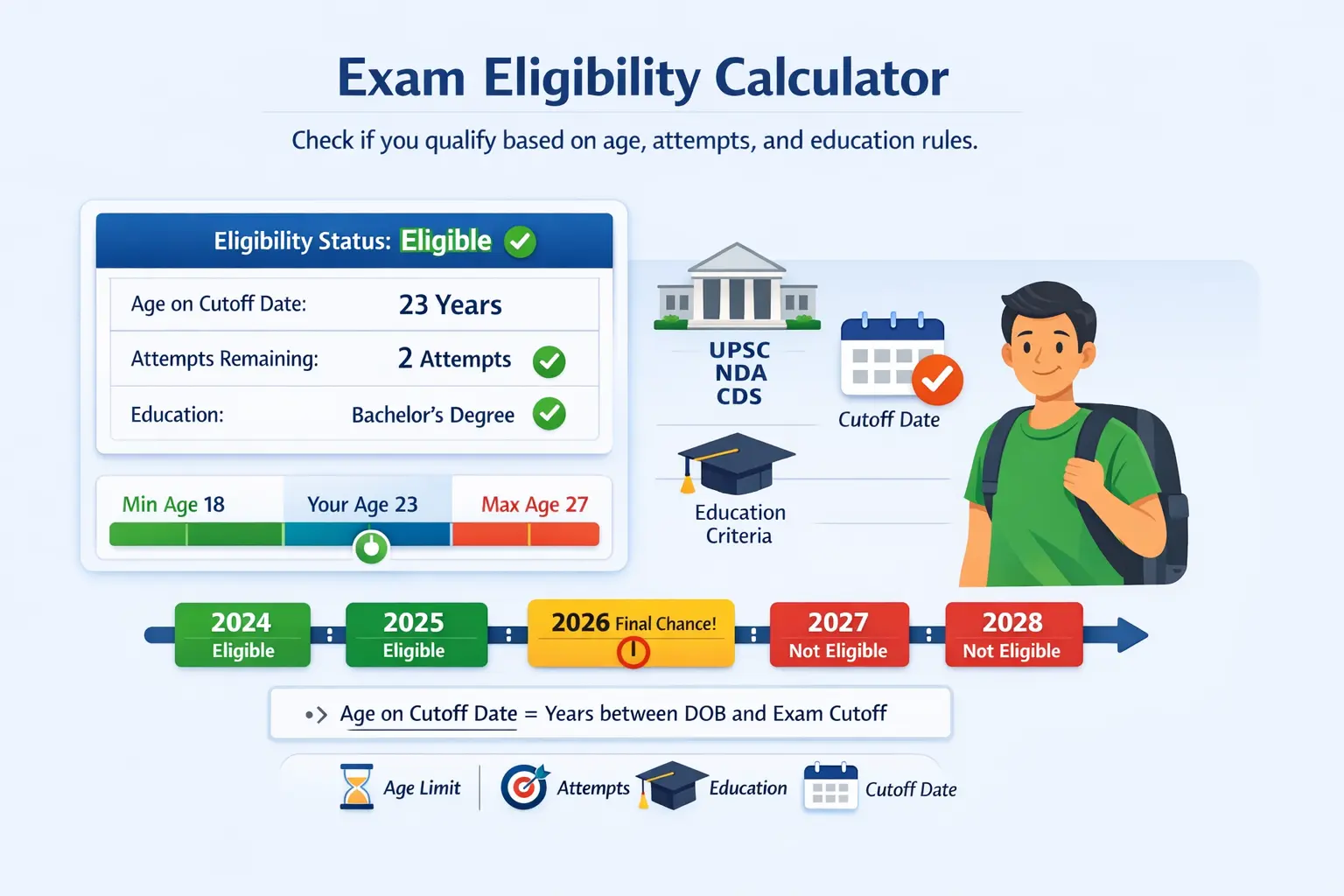
Your exam eligibility result shows if you meet the rules required to apply for an exam. These rules usually include age limits, education requirements, and attempt limits. Many competitive exams follow strict eligibility policies. For example, UPSC Civil Services uses a defined age range and attempt limit for each category.
If the calculator shows Eligible, you meet all required rules for the selected exam year. Your age falls within the allowed range. Your education level also meets the requirement. If the exam has attempt limits, you still have attempts left.
If the result shows Not Eligible, one rule blocks your application. This may happen if you exceed the maximum age, have no attempts left, or do not meet the education requirement.
Sometimes the result shows Eligible in a future year. This means you are currently under the minimum age. However, you will meet the required age in a later exam year.
This eligibility check helps you understand your status before applying. It also helps you plan your exam attempts and preparation timeline.
What Each Result Field Means
Verdict badge
The verdict badge shows the final decision. It quickly tells you if you are Eligible, Not Eligible, or Eligible in a future year.
Why this result
This section explains the rule that affected your eligibility. It clearly states if age, education, or attempts caused the result.
Age on cutoff date
Most exams calculate age using an official cutoff date. The calculator finds your exact age on that date. This value determines if you fall within the allowed age range.
Maximum age after relaxation
Some categories receive additional years in the age limit. For example, OBC or SC/ST candidates may receive age relaxation. The calculator adds this relaxation to the maximum age when the exam preset allows it.
Attempts remaining
Some exams limit how many times you can apply. The calculator subtracts your used attempts from the allowed attempts. This shows how many chances you still have.
Eligibility runway
The runway view shows your likely eligibility for the next five years. It marks years where you are eligible, your final chance year, and years where you become ineligible due to age.
Example Results
Example result
Eligible
Meaning: You meet the age rule, the education requirement, and the attempt limit for the selected exam year.
Example result
Not eligible due to education requirement
Meaning: Your age fits the exam rule. However, your current education level does not meet the minimum qualification.
How to Use the Exam Eligibility Calculator
This exam eligibility calculator helps you check eligibility before you apply. It uses your date of birth, exam year, category, education, and attempts used. Then it shows a clear verdict and a 5-year plan view. Follow these steps.
Choose your exam type
Pick UPSC, NDA, CDS, Defence, or Custom Exam. Presets use built-in rules and cutoff dates. Custom lets you enter your own limits.
Select the target exam year
Choose the year you plan to apply. If you need a different year, select Custom year. Then type the year you want.
Enter your date of birth and details
Add your date of birth exactly as written on your documents. Then pick your category and education status. This sets your age rule and education check.
Add attempts used
Type how many attempts you already used. Enter 0 if you never attempted the exam. This step matters most when the exam limits attempts.
Click Check My Eligibility and review results
Click the button to get your verdict. Then read the reason section. After that, use the 5-year runway to plan your next steps.
Example for testing
Try these sample inputs to test the tool.
- Exam type: UPSC Civil Services
- Target year: 2026
- Date of birth: 2000-07-10
- Category: General
- Education status: Graduation
- Attempts used: 2
Result you will see:
Eligible. Your age on the cutoff date falls within the allowed range. You also meet the education rule. You still have attempts left, so the exam eligibility check should pass.
Now enter your own numbers and check how close you are.
How the Exam Eligibility Calculator Formula Works (Complete Breakdown)
The exam eligibility calculator checks if you qualify based on age, category rules, education, and attempts. Many competitive exams use strict cutoff dates. Therefore, your age is calculated using your date of birth and the official exam cutoff date. The calculator checks your minimum age, maximum age, and attempt limits. If you meet every rule, the tool marks you as eligible. If one rule fails, the result shows the exact reason. Understanding the formula helps you verify the result and plan your exam year correctly.
Age on Cutoff Date Formula
Your age must match the exam rule on a specific cutoff date. The calculator counts only completed years.
Formula
Age = full years between Date of Birth and Cutoff Date
This method ignores partial years. For example, if you turn 25 after the cutoff date, the calculator still counts you as 24.
Example
Date of Birth: 15 August 2001
Cutoff Date: 1 August 2026
Age on cutoff date = 24 years
This value is used to check both the minimum and maximum age rules.
Category Relaxation Rule
Many exams allow extra years for specific categories. The calculator adjusts the maximum age using category relaxation.
Formula
MaxAgeAdjusted = MaxAgeBase + RelaxationYears
For example, if the base maximum age is 32 years and the category relaxation is 3 years, the adjusted maximum age becomes 35 years. The exam eligibility calculator uses this value to confirm if your age still fits within the allowed limit.
Attempts Eligibility Check
Some exams limit how many times you can apply. The calculator compares your attempts used with the allowed attempts.
Rule
Pass if AttemptsUsed < AttemptsAllowed
If you already used the maximum attempts, the calculator marks the result as not eligible. If attempts remain, you can still apply.
Eligibility Runway Logic
The calculator also shows a planning view for future exam years. This view helps you understand how long you remain eligible.
Logic
The tool checks each year from the target year to the next four years. If your age still fits the rule, that year is marked eligible.
If the next year becomes the last possible year, it is marked Final chance. This runway view helps you plan preparation and attempts early.
Variable Definitions
DOB
Your date of birth entered in the calculator.
Y
Target exam year you want to check.
Cutoff Date
Official exam cutoff date for the selected year.
MinAge
Minimum age required to apply.
MaxAgeBase
Maximum allowed age before category relaxation.
RelaxationYears
Extra years added to the maximum age based on category rules.
AttemptsUsed
Number of attempts you already used.
AttemptsAllowed
Maximum attempts permitted for the exam. Some exams limit attempts. Others do not.
Examples and Use Cases
Real examples help you understand how the exam eligibility calculator works. These scenarios show how age, cutoff date, education, and attempts affect your eligibility. The calculator uses the same logic used in real exam notifications.
Example 1. Am I Eligible for UPSC at Age 30
This example checks eligibility for the UPSC Civil Services exam using the standard age rule.
Given
- Exam Type: UPSC Civil Services
- Target Year: 2026
- Date of Birth: 10 June 1996
- Category: General
- Education: Graduate
- Attempts Used: 3
Calculation
					Cutoff Date: 1 August 2026

Age on cutoff date = 30 years

UPSC age rule for General category:
Minimum age = 21
Maximum age = 32

Attempts allowed = 6
Result:
- Age Check: Passed
- Attempts Remaining: 3
- Education Check: Passed
Verdict: Eligible
Meaning
The candidate meets all UPSC eligibility rules. The age is below the maximum limit and attempts remain. The exam eligibility calculator marks the candidate as eligible for the 2026 exam year.
Example 2. Can I Give NDA Exam After 12th
This example checks eligibility for the NDA exam, which requires candidates to meet strict age and education rules.
Given
- Exam Type: NDA
- Target Year: 2027
- Date of Birth: 5 March 2009
- Category: General
- Education: 12th Grade Passed
- Attempts Used: 0
Calculation
					Cutoff Date: 1 January 2027

Age on cutoff date = 17 years

NDA age rule:
Minimum age = 16.5
Maximum age = 19.5

Education rule: 12th pass or appearing
Result
- Age Check: Passed
- Education Check: Passed
- Attempts Check: Not limited
Verdict: Eligible
Meaning
The candidate meets both the age and education rules. The calculator confirms the student can apply for the NDA exam in the selected year.
Result Benchmarks and Ranges
Your exam eligibility check gives you a clear decision. Still, you should know what that decision means. This table explains each result in plain language. It also helps with common questions like what age is eligible for UPSC exam and what age is too late for NDA.
If you see Eligible, your age, education, and attempts match the rules for that exam year. If you see Eligible in YYYY, you are too young today. However, you may meet the minimum age in a future year. If you see Not Eligible, at least one rule blocks you. Check the “Why this result” box for the exact reason.
| Range | Label | USA Guideline | India Guideline | Notes |
|---|---|---|---|---|
| Passes age + education + attempts | Eligible | Use official exam notice rules for your state or testing body. | Matches preset cutoff rules for exams like UPSC, NDA, and CDS. | You can apply for the selected exam year. |
| Age too young today | Eligible in YYYY | Some programs allow a future year if you meet the min age later. | Common for defence exams when you miss the min age on cutoff date. | Change the target year to find your first eligible year. |
| Fails age or attempts or education | Not Eligible | Most exam systems block if you miss any required rule. | Usually blocked for overage, low education level, or attempts used. | Read “Why this result” to see the exact rule that failed. |
Heads-up: Eligibility rules change by exam, year, and category. Always confirm the latest official notice before you apply.
What age is eligible for UPSC exam?
It depends on the exam year cutoff date and your category. This calculator uses the preset cutoff date and adds relaxation when the preset supports it.
What age is too late for NDA?
If your age is above the maximum on the cutoff date, you will see Not Eligible.
What does eligible or not eligible mean in exam eligibility check?
Eligible means you passed every rule. Not eligible means at least one rule failed. The reason box tells you which one.
Tips and Planning Based on Your Result
An exam eligibility calculator is not only a yes or no tool. It is also a planning tool. Use your result to pick the next best move. Then check again with small changes. That is how you avoid a failed exam eligibility check later.

If you are Eligible
You meet the age, education, and attempt rules for this exam year. Now, save your target year. Then check the next year too. This helps you plan your timeline and keep your options open.
If you see Eligible in a future year
You are too young for this year. That is common for defence exams. Switch the target year forward until the verdict turns to Eligible. Then you know your first safe year to apply.
If you are Not Eligible
Do not guess. Read the “Why this result” message. If the issue is attempts used, update that number and re-check. If the issue is education, pick the correct education status and run it again.
Custom exam tip
Use Custom Exam only when you know the rules. Keep the cutoff date as Jan 1 if you are not sure. Set a custom cutoff date only when the official notice gives a month and day.
You Might Also Find These Helpful
Common Mistakes to Avoid When Calculating
- Entering a date of birth (DOB) that does not match official documents.
- Selecting the wrong exam preset. UPSC, NDA, and CDS follow different age rules.
- Forgetting to choose your category. Relaxation rules can increase the maximum age limit.
- Entering attempts used higher than your real number.
- Using Custom exam mode with a guessed cutoff date instead of the official rule.
Frequently Asked Questions (FAQs)
What is an exam eligibility calculator?
An exam eligibility calculator checks if you meet the rules for a specific exam. It uses your date of birth, exam year, education status, and attempts used. Then it shows a result such as Eligible, Not Eligible, or Eligible in a future year. This tool helps you avoid rejected applications. It checks the rules before you apply and shows the exact reason if you do not qualify.
How does an exam eligibility check work with cutoff dates?
An exam eligibility check uses a cutoff date to lock your age for the exam year. The calculator measures your age on that exact date. It does not use your current age. If your age falls outside the allowed range, the result shows Not Eligible. Most exams publish the cutoff date in the official notice. Therefore you should always verify the date in the exam notification.
How do you calculate UPSC exam eligibility by age?
To calculate UPSC exam eligibility, select the UPSC Civil Services preset and enter your date of birth. Then choose the target exam year. The calculator finds your age on the UPSC cutoff date and compares it with the allowed age range. It also checks category relaxation and attempts used. As a result, you see a clear eligibility decision for that exam year.
How do you check NDA exam eligibility by DOB?
To check NDA exam eligibility, select NDA as the exam type and enter your date of birth. Then choose the exam year. The calculator finds your age on the NDA cutoff date and compares it with the allowed age range. If you are too young for the selected year, the tool may show a future year when you become eligible.
Why does the tool show Eligible in YYYY?
The message Eligible in YYYY appears when you are too young for the selected exam year. The calculator checks the minimum age rule on the cutoff date. Then it scans the next few years using the same rule. As a result, it shows the first year when your age will meet the minimum requirement.
What is a defence exam eligibility calculator used for?
A defence exam eligibility calculator checks if you meet the age and education rules for defence related exams. It also reviews attempts when the exam has a limit. This helps candidates avoid mistakes before applying. Many users also use the runway view. It shows the next few years when they can apply.
What is the navy advancement exam eligibility calculator?
A navy advancement exam eligibility calculator checks service related rules for navy promotion exams. These rules often include time in service and time in rate. They differ from civil exam rules. This calculator focuses on age, education, and attempts for common exam presets. Therefore you should confirm navy advancement rules using official policy documents.
Questions?
We had love to hear from you! Whether you are reporting an issue, suggesting a new calculator, or exploring collaboration opportunities — we are here to help. Every message helps us make 100calc smarter, faster, and more helpful for everyone.
Why People Trust 100calc
At 100calc.com, we focus on accuracy, speed, and trust. Every calculator we create is designed to give reliable, instant, and easy-to-understand results you can truly depend on.