
Weighted Grade Calculator
Looking for a fast and accurate weighted grade calculator? This tool helps you instantly find your current course grade. You can calculate a percentage-based syllabus. Alternatively, you can use it as a points grade calculator.
Unlike basic tools, our Calculator predicts your absolute grade. It shows exactly what you will get if you score a zero on your remaining assignments. Furthermore, it provides a true impact breakdown. This feature reveals how much each test affects your final weighted grade. High school students can track their overall progress easily. College students at universities like Mercer also rely on this semester grade calculator. You can quickly factor in extra credit. Plus, you can see exactly what score you need on your upcoming final exam.
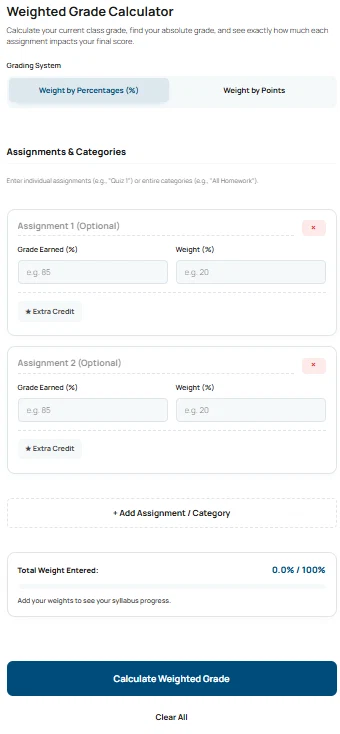
Weighted Grade Calculator
Calculate your current class grade, find your absolute grade, and see exactly how much each assignment impacts your final score.
Enter individual assignments (e.g., "Quiz 1") or entire categories (e.g., "All Homework").
Add your weights to see your syllabus progress.
Current Course Grade
Based on the work completed so far.
This is your final grade if you score a 0 on the remaining 0% of the syllabus.
True Impact Breakdown
How many final grade points you earned from each category.
What are Weighted Grades?
In high school and college, classes use a weighted system where assignments are worth varying amounts. Based on your inputs, you currently have a course grade based on the syllabus you completed. Your instructor will sum the points for each group to provide your final weighted grade.
What Your Weighted Grade Calculator Result Means
Your weighted grade calculator results show more than a simple final number. They explain your exact academic standing. This section helps you understand your current grade and your absolute grade. Furthermore, it explains your true impact breakdown. Use it to make smarter study decisions.
What Current Course Grade Means
Your current course grade reflects only the work you have completed so far. You might enter 40 percent of your syllabus weight. Then, your grade shows your performance on just that 40 percent. Therefore, this number ignores any future assignments entirely. You can use this as a fast semester grade calculator to track your progress accurately.
Understanding Your Absolute Grade
The absolute grade predicts your final class grade. It assumes you earn a zero on all missing future assignments. This feature acts as a powerful what if grade calculator before finals. Consequently, you can see the absolute minimum score you will get if you stop working today.
How True Impact Breakdown Works
The true impact breakdown reveals the exact value of each assignment. Some tests carry more weight than others. First, the calculator reviews your grading system. Next, it shows how many percentage points each task adds to your total. Because of this, you know exactly where to focus your study energy next.

Test the Weighted Grade Calculator With Real Examples
Use the examples below to test the calculator. Enter the values exactly as shown. You can change them later to match your own weighted grade calculator needs.
Example 1: Calculating Percentage with Extra Credit
Use this to test: ercentage Mode with Extra Credit
Grading System: Weight by Percentages (%)
Assignment 1: Midterm Exam, Earned 85, Weight 30
Assignment 2: Homework, Earned 90, Weight 20
Assignment 3: Pop Quiz, Earned 100, Weight 5, Check “★ Extra Credit”
What you should see:
Current course grade around 97.00% (A+).
Total weight entered stays at 50%.
Results boost your score without penalizing the required total.
Example 2: Estimating a Points-Based Syllabus
Use this to test: Points Grade Calculator Feature
Grading System: Weight by Points
Assignment 1: Essay, Earned 45, Max Points 50
Assignment 2: Project, Earned 88, Max Points 100
What you should see:
Total possible points equal 150.
Current course grade around 88.67% (B+).
Breakdown shows exact points earned for the final grade calculator pool.
Explore More Calculators
Use our easy average grade calculator to find your exact class percentage. You can instantly compute weighted scores and predict your final exam grade.
Try calculatorStop guessing your semester average today. Use our final grade calculator to find exactly what test score you need to pass. Calculate your safe…
Try calculatorUse our free easy grade calculator to find exact test percentages and letter grades. It perfectly supports half points, custom scales, and teacher charts.
Try calculatorYour grade may be higher than you think. Use this Grade Curve Calculator to test 5 curve methods and see your adjusted score instantly…
Try calculatorStop guessing your exam scores. Use our free Marks Percentage Calculator to find your exact academic grade. Instantly convert your marks to CGPA today.
Try calculatorStop guessing your class grade. Our unweighted grade calculator finds your straight average instantly. Convert percentages to a 4.0 GPA scale. Try it now!
Try calculatorHow to Use the Weighted Grade Calculator
Using this tool is very simple. You only need your current class syllabus. The weighted grade calculator uses your actual scores to find your class average. It relies on standard academic grading formulas. You can also use it as a reliable semester grade calculator. Follow these five steps. You will get your result instantly.
Select Your Grading System
First, identify your class structure. Select the percentage mode if your syllabus uses percentages. For example, exams might be 50 percent of your grade. Alternatively, select the points mode. You should use this if your assignments have flat point values.
Enter Assignment Details
Next, type the name of your assignment. Then, input the exact grade you earned. After that, enter the total weight or maximum points possible. You must fill out these fields correctly for accurate results.
Toggle Extra Credit
Sometimes, teachers give bonus points. If an assignment is extra credit, check the star box. This step is crucial. It boosts your earned score instantly. However, it does not increase your required syllabus total.
Monitor the Tracker
Now, look at the progress bar at the bottom. Watch the total weight entered carefully. This bar ensures your syllabus adds up correctly. It will warn you if you exceed 100 percent.
Review True Impact
Finally, click the calculate button. The results panel will instantly display your current standing. Furthermore, you will see exactly how many final grade points you earned from each category.
Quick Formula Used
Current Grade = (Total Earned Points / Total Possible Points) × 100
Why This Process Is Accurate
This method matches official university grading systems perfectly. It calculates your true average without guesswork. Therefore, your estimate reflects your actual academic standing.
Try It Yourself
Enter a midterm grade of 85 percent.
Add an extra credit quiz worth 5 percent.
Toggle the extra credit box on.
Watch your weighted grade calculator results jump up instantly.
Weighted Grade Formula Explained (Complete Breakdown)
This section explains exactly how our tool calculates your final score. It reveals the math behind percentage weights and flat points. Because we do not have access to your school grading software, we calculate your theoretical average using the numbers you provide. This helps you understand where the numbers come from. You will see why accuracy depends on precise inputs.
First, we multiply your earned score by its weight. Then, we add all those values together. After that, we divide that number by the total weight you entered. This process acts as a highly accurate average grade calculator.
The Weight Formulas
These formulas power the grading logic. They convert your individual assignment scores into a final percentage.
The Formula:
					Percentage Mode Formula:
Current Grade = (Sum of (Grade Earned × Weight) / Sum of Weights Entered) × 100

Points Mode Formula:
Current Grade = (Sum of Earned Points / Sum of Max Points) × 100
Variable 1: Grade Earned
First, we look at the score you received on the assignment. This number represents your raw performance. For example, you might earn an 85 on a test. We use this number as the baseline for your average.
Variable 2: Weight or Max Points
Next, we determine the value of the assignment. In percentage mode, this is the percentage of the final grade the assignment represents. In points mode, this is the maximum possible score. This variable creates the denominator of your final equation.
Variable 3: Extra Credit Factor
Finally, we apply the most critical adjustment. If you toggle extra credit, we add those points strictly to the numerator. Therefore, we do not expand the denominator. This boosts your score significantly without penalizing your required syllabus total.
Example Calculation You Can Test
Use this exact input to test the calculator logic. We show the math step-by-step so you can see how individual scores turn into a final average.
Example 1: Percentage Mode with Extra Credit
Given:
Grading System: Weight by Percentages (%)
Assignment 1 (Lab Work): Earned 75, Weight 40
Assignment 2 (Test 1): Earned 82, Weight 30
Assignment 3 (Bonus Quiz): Earned 95, Weight 5 (Extra Credit Toggle ON)
Calculation:
					Determine Total Weighted Score:
First, multiply your scores by their specific weights.
(0.75 × 40) + (0.82 × 30) + (0.90 × 5) = 30 + 24.6 + 4.5 = 59.1 points.

Determine Total Weight Used:
Next, add the required syllabus weights together.
We exclude the extra credit weight from this total.
40 + 30 = 70 percent total weight.

Apply Formula:
Finally, divide your total score by the total weight used.
(59.1 / 70) × 100 = 84.43%
Result:
Current Grade: 84.43% (B)
Therefore, your weighted grade calculator updates your average instantly. You should see this exact number in the calculator result panel.
Why This Formula Matters
This formula calculates your exact academic standing using standard school math. It does not guess or estimate. It reflects your actual earned average grade calculator results perfectly. Because of this, your output matches your teacher’s gradebook exactly. You now have a reliable baseline before taking your final exams.
Understanding Your Weighted Grade Results
Your weighted grade calculator results show more than just a final number. Instead, they help you understand your true academic standing. Teachers and universities use specific letter scales for different classes. Therefore, you need to know what your calculated percentage actually means. Here is a quick breakdown. Consequently, this table will help you read your results and understand standard academic benchmarks.
| Percentage Range | Letter Grade | Academic Meaning |
|---|---|---|
| 97.00% - 100% | A+ | Exceptional Mastery |
| 93.00% - 96.99% | A | Excellent |
| 90.00% - 92.99% | A- | Very Good |
| 83.00% - 86.99% | B | Good |
| 73.00% - 76.99% | C | Average / Satisfactory |
| 65.00% - 69.99% | D | Passing but Below Average |
| Below 65.00% | F | Failing |
Important: These benchmarks represent a Standard Academic Grading Scale. Your specific school or university syllabus may have slightly different cutoffs for plus or minus letter grades.
How to Read This Table With the Calculator
First, enter your assignment scores into the weighted grade calculator above. Next, note your final percentage result. Now, compare your calculated score against the percentage range column. Then, find your matching letter grade. This comparison acts as a quick academic check. It tells you immediately where you stand in the class.
What This Means For You
If your calculator result falls inside the green zone, you are doing very well. However, if your result drops below 70 percent, you must study harder. This table helps you avoid unwanted surprises during finals week. Because of this, high school students can track their progress easily. Furthermore, college students at schools like Mercer University or UCLA use this exact grading scale. Therefore, if you are applying to a competitive uni, you know exactly what letter grade you need. You can easily see if you require extra credit to secure an A.
Quick Example Using the Table
Inputs:
Grading System: Weight by Percentages (%)
Calculated Score: 85.50 percent
Results you will see:
Calculator Result: 85.50 percent
Table Range: 83.00 percent to 86.99 percent
Since 85.50 percent fits perfectly inside that range, you earn a solid B. As a result, you can be highly confident in your current standing.
Insights and Smart Recommendations
Use your weighted grade calculator results to make smarter study decisions. First, review your current academic standing. Next, compare your actual score with your syllabus goals. This action highlights exactly where you need improvement. As a result, these quick tips will help you act with confidence and reduce exam stress before finals week.
Prioritize Heavy Weights
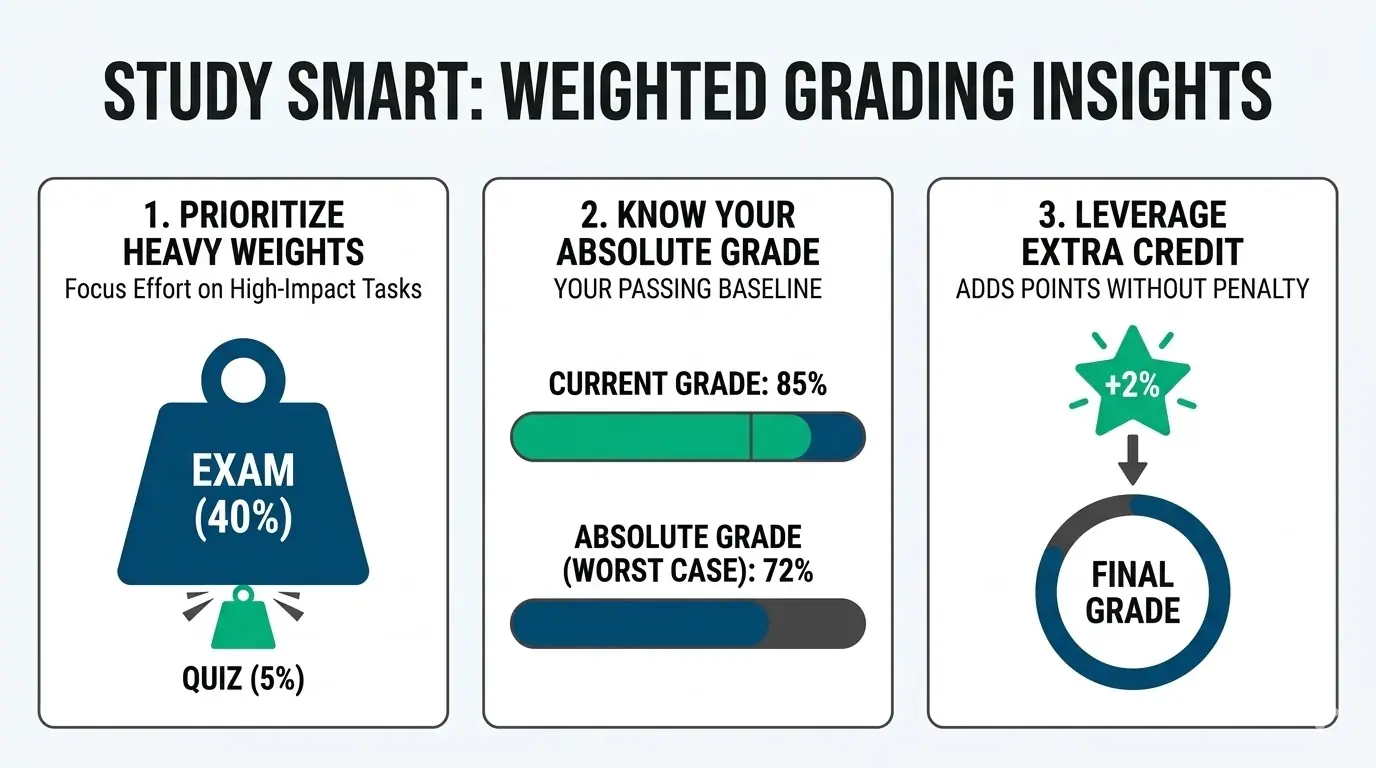
- Focus on big impacts: A major midterm creates a massive jump in your final score.
- Check the math: For example, a 40 percent exam carries drastically more impact than a 5 percent quiz.
- Plan your time: Therefore, you must always focus your study energy on high-weight categories first.
Use the Absolute Grade for Peace of Mind
- Find your baseline: This feature calculates your lowest possible score. It assumes you earn a zero on all future tests.
- Reduce exam stress: Because of this, you find your worst-case scenario instantly.
- Know your standing: Perhaps your absolute grade is 75 percent. If you only need a 70 percent to pass, you have mathematically passed already.
Understand Extra Credit Power
- Boost your score: Bonus tasks boost your earned points directly. They never increase your required syllabus total.
- Maximize your effort: As a result, a perfect score on a 2 percent extra credit task adds 2 full percentage points to your average.
- Use the right tool: This specific logic makes our app the ultimate weighted final grade calculator.
You Might Also Find These Helpful
Grades 7
Use the UQ Grade Calculator to find your current mark, the score needed on remaining work, your possible grade range, and UQ GPA before…
Try calculatorCommon Mistakes When Calculating Weighted Grades
Calculating your average requires precise inputs. First, small errors in your entries lead to inaccurate totals. Next, this tool relies on your exact data. Below are the most common mistakes students make. Therefore, reading this helps you get the exact final score.
- Treating Extra Credit as Regular Weight: Adding bonus points as a standard assignment is a huge error. This mistake increases your required syllabus total. Consequently, it gives you an inaccurate lower final grade. Instead, you must always use the specific extra credit toggle.
- Mixing Up Points and Percentages: Entering a 45 out of 50 score into the percentage mode will skew your results. First, you must match your school grading system correctly. Therefore, always select the correct points or percentage mode first. This simple step makes your class weighted grade calculator highly accurate.
- Forgetting Unentered Assignments: Many users forget that unentered weights have not happened yet. First, your current score only reflects finished homework. However, you might want to know your worst-case scenario. Therefore, always look at the absolute grade box to plan your next steps.

Frequently Asked Questions (FAQs)
How do you calculate a weighted grade?
You calculate a weighted average by multiplying each assignment score by its assigned weight. Next, you add all these total values together. Finally, you divide that sum by the total amount of weights entered. This math gives you your exact class average.
Therefore, a heavy test impacts your final score much more than a daily quiz. You can use our tool to find this number instantly.
How do you make a weighted grade calculator in Excel?
You can make a spreadsheet calculator using the SUMPRODUCT function. First, put your grades in one column. Then, put your weights in the next column. After that, multiply the two columns and divide the result by your total weight.
For example, type =SUMPRODUCT(A2:A5, B2:B5) / SUM(B2:B5). However, using our free online tool is much faster and prevents common spreadsheet errors entirely.
What happens if my syllabus weights do not equal 100 percent?
Your current class score only reflects the assignments you have finished. Therefore, your total weight does not need to equal 100 percent right now. The calculator simply divides your earned points by the specific weight you have completed so far.
Consequently, this shows your exact standing today. You can use our absolute grade feature to see your worst-case scenario if you miss future tests.
Does extra credit affect a weighted grade differently?
Yes, extra credit impacts your score differently than standard tests. Teachers add bonus points directly to your total earned points. However, they do not increase the maximum possible points for the class. This specific method boosts your average significantly.
Because of this, you earn pure percentage points without penalty. Always complete extra credit to protect your final letter grade from future mistakes.
What is a good weighted final grade?
A good weighted score depends on your specific school standards. Generally, most schools consider a score above 90 percent excellent. This earns an A letter grade. Meanwhile, a score above 80 percent represents a good mark and earns a solid B.
Most universities require at least a 70 percent to pass a course. Therefore, you should always aim to keep your average above that academic baseline.
Questions?
We had love to hear from you! Whether you are reporting an issue, suggesting a new calculator, or exploring collaboration opportunities — we are here to help. Every message helps us make 100calc smarter, faster, and more helpful for everyone.
Why People Trust 100calc
At 100calc.com, we focus on accuracy, speed, and trust. Every calculator we create is designed to give reliable, instant, and easy-to-understand results you can truly depend on.