
UQ Grade Calculator: Can You Still Reach Your Target Grade?
The UQ Grade Calculator checks your current weighted mark, shows how much course weight remains, and finds the average needed to reach grades 4 to 7. It also calculates a unit-weighted UQ GPA from completed course results. Add custom grade boundaries or a course-profile hurdle when your course uses different rules. The result is an estimate based on the values you enter.
A strong quiz mark can hide a weak final position when the task carries little weight. Enter your real assessment weights, leave unfinished marks blank, and test your target before the final. You will see whether the grade is reachable, blocked by a hurdle, or no longer possible.
Quick Facts
- Check your current average and earned percentage points.
- Find the mark needed across remaining assessments.
- Compare your possible final grades from 1 to 7.
- Add custom boundaries and course-profile hurdle rules.
- Calculate UQ GPA with separate treatment for P and N results.
- Updated Jul 31, 2026
- Reviewed by Academic Grading Systems Editor
University of Queensland Grade Calculator
Default UQ 7-Point ScaleUse this UQ grade calculator to check your current weighted mark, estimate the score needed on remaining assessments, or calculate a unit-weighted UQ GPA.
Do not assume every course uses a 40% exam hurdle or a grade 3 cap. Copy these values from your course profile.
Grade 1 starts at 0%. Each minimum must be lower than the grade above it.
Choose a target to find the average mark needed across your remaining assessment weight.
UQ Grade
International GPA Conversion
International GPA conversion depends on the receiving institution. Use its published conversion method or request an official assessment.
Personalized Academic Insights
UQ Grading Scale and Grade Boundaries
UQ reports graded course results on a 7-point scale. Grades 4 to 7 are passing grades, while grades 1 to 3 are failing grades. Percentage cut-offs, rounding rules, and hurdle conditions may vary by course, so check the grading information in your course profile before relying on any estimate.
| Percentage Range | UQ Grade | Grade Description | GPA Value | What to Check |
|---|---|---|---|---|
| 85%–100% | Grade 7 | High Distinction | 7 grade points | Confirm the grade 7 boundary and any high-grade hurdles in the course profile. |
| 75%–Below 85% | Grade 6 | Distinction | 6 grade points | Check whether a final exam, project, or other task must meet a separate minimum. |
| 65%–Below 75% | Grade 5 | Credit | 5 grade points | Review custom course boundaries before treating this as a confirmed grade. |
| 50%–Below 65% | Grade 4 | Pass | 4 grade points | A passing overall mark may still be limited by an unmet hurdle requirement. |
| 45%–Below 50% | Grade 3 | Marginal Fail | 3 grade points | You may be eligible for supplementary assessment under current UQ rules. |
| 25%–Below 45% | Grade 2 | Fail | 2 grade points | Check the official result and seek course or academic advice where needed. |
| 0%–Below 25% | Grade 1 | Low Fail | 1 grade point | Review your official result and the available academic support options. |
| Non-Graded Pass | P | Pass without a numerical grade | Excluded from GPA | The course may still count toward program credit even though it does not affect GPA. |
| Non-Graded Fail | N | Fail without a standard numerical grade | Counted as grade 2 | The calculator includes the course units and applies grade point 2. |
Important: These are the UQ Grade Calculator’s default percentage boundaries. Your course profile may use different cut-offs, rounding rules, assessment conditions, or hurdle requirements. Enter custom boundaries when your published course rules differ.
How Numerical Grades Affect GPA
A numerical course grade normally contributes the same grade-point value to the GPA calculation. A grade 7 contributes 7 grade points per included unit, while a grade 4 contributes 4 grade points per unit.
Courses with more units carry more weight. The calculator multiplies each included numerical grade by its course units before calculating the cumulative GPA.
How Non-Graded Results Are Treated
A non-graded P result does not act like a numerical grade of zero. The calculator excludes it from both grade points and GPA-bearing units.
An N result counts as grade 2. Results marked G, M, K, or X count as grade 0 under the calculator’s current logic. Other special results are excluded and flagged for manual review.
Check Course-Specific Rounding Rules
Do not assume that every decimal mark rounds up in the same way. A result such as 74.5% may round to 75% in a course that uses standard algebraic rounding, but another course may describe grade finalisation differently.
Use the exact rounding or grade-boundary wording shown in your course profile.
Check Hurdles Before Trusting the Percentage
Meeting an overall percentage does not always secure the matching numerical grade. A course may require a minimum exam mark, project result, laboratory score, or another must-pass condition.
Enter the actual hurdle minimum and grade cap from your course profile. A failed hurdle can reduce the final grade even when the weighted course percentage is high.
Understanding Your UQ Grade Calculator Result
Your main result depends on the mode and values entered. It may show your current assessment average, the mark needed on remaining work, an estimated course grade, or your cumulative UQ GPA.
Read the supporting figures before judging the main number. Assessment weight, points earned, remaining work, custom boundaries, and hurdle rules can change what the result means.
Understanding Your Result
Your result changes based on the mode you selected. It may show a current course average, the mark needed on remaining work, an estimated UQ grade, or a cumulative GPA.
Check the supporting values before judging the main number. Assessment weight, earned points, remaining course work, grade boundaries, and hurdle rules explain how the calculator reached the result.
Current Average on Completed Work
This percentage covers assessments with entered marks. Blank future assessments do not affect it.
A high current average does not guarantee the same final grade. A strong mark on a small task may add only a few points to the full course result.
Percentage Points Earned
This value shows how many points you have secured toward the final 100%.
A 90% mark on a quiz worth 10% adds 9 percentage points. Your current average would be 90%, but only 9 points are secured toward the final mark.
Required Remaining Average
This is the average needed across all unfinished course weight.
- 0% or below: Enough weighted points already support the target.
- 0.01% to 100%: The target remains mathematically reachable.
- Above 100%: The remaining work cannot produce enough points.
- Blocked by hurdle: Your entered grade cap is below the target.
A reachable result does not guarantee the grade. It shows the average you must maintain from this point.
Possible Grade Range
The lowest grade assumes you score 0% on all remaining work. The highest assumes you score 100%.
This range shows what is still mathematically possible. A failed hurdle may lower the maximum grade. A pending hurdle means the final result cannot be confirmed yet.
Cumulative UQ GPA
Your GPA is weighted by course units. A course with more units has a greater effect on the final average.
Numerical grades from 1 to 7 count toward the calculation. A P result is excluded. An N result counts as grade 2. G, M, K, and X count as grade 0 in this calculator.
Other special results are left out and flagged for review. Check your official record before relying on the estimate.
Is Your Result Good or Bad?
A required remaining average between 0% and 100% means the target is still possible. Lower values leave more room for variation. Results near 100% require almost perfect marks on the unfinished work.
A numerical course grade of 4 or higher is a passing result. Grade 3 is a marginal fail, while grades 1 and 2 are failing results. Course-profile hurdles may still affect the final grade.
A higher GPA reflects stronger unit-weighted course grades. This calculator does not label a GPA as good, poor, honours-level, or suitable for a program. Those decisions depend on the rule or opportunity you are checking.
What You Should Do Next
- Compare the required average with marks you normally achieve.
- Test a lower and higher target grade.
- Check your course profile for custom cut-offs and hurdles.
- Leave unfinished assessment marks blank instead of entering zero.
Focus on assessments with the largest weights. They have the greatest effect on your remaining course result.
Quick Example to Test
Enter these values in Course Predictor:
- Assignment: 25% weight and 68% mark
- Quiz: 15% weight and 80% mark
- Leave the remaining assessments blank
- Select grade 5 as the target
- Use the default grade 5 boundary of 65%
The assignment adds 17 percentage points. The quiz adds 12 points. That gives 29 points from 40% completed course weight.
Your current average is 72.5%. The course still has 60% remaining.
To reach the grade 5 boundary:
Required remaining average = (65 − 29) ÷ 60 × 100 = 60%
The target is reachable. You need a 60% average across the unfinished course weight. Without a hurdle, your possible final grade range remains grade 2 to grade 7.
Explore More Calculators
Use our easy average grade calculator to find your exact class percentage. You can instantly compute weighted scores and predict your final exam grade.
Try calculatorStop guessing your semester average today. Use our final grade calculator to find exactly what test score you need to pass. Calculate your safe…
Try calculatorUse our free easy grade calculator to find exact test percentages and letter grades. It perfectly supports half points, custom scales, and teacher charts.
Try calculatorYour grade may be higher than you think. Use this Grade Curve Calculator to test 5 curve methods and see your adjusted score instantly…
Try calculatorStop guessing your exam scores. Use our free Marks Percentage Calculator to find your exact academic grade. Instantly convert your marks to CGPA today.
Try calculatorStop guessing your class grade. Our unweighted grade calculator finds your straight average instantly. Convert percentages to a 4.0 GPA scale. Try it now!
Try calculatorHow to Use the UQ Grade Calculator
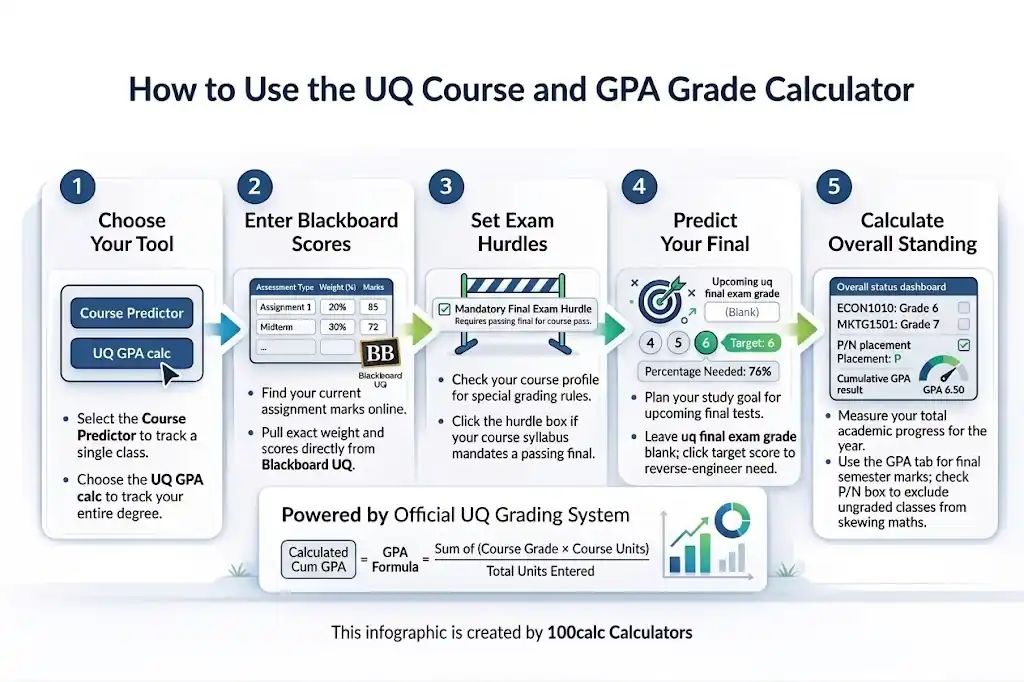
Choose the calculation that matches your question. Enter the values shown on your course records or course profile. The UQ Grade Calculator checks weights, marks, grade boundaries, hurdles, course units, and final results before showing the answer.
Choose the Right Mode
Use Course Predictor to check one course or plan a target grade. Select Cumulative GPA when you already have final course results. Each mode uses different values, so choose based on whether you are tracking assessments or combining completed courses.
Enter Your Academic Results
Add each completed assessment mark with its percentage weight. Leave future marks blank so they remain unfinished. For GPA, enter each completed course, its unit value, and final result. The calculator rejects missing grades, invalid units, and marks outside 0% to 100%.
Match Your Course Rules
Check the current UQ course profile before calculating. Turn on custom boundaries when the published grade cut-offs differ from the default scale. Add the hurdle assessment, required mark, and grade cap when the course has a hurdle. Pending hurdle marks may remain blank.
Set Your Target Grade
Choose grade 4, 5, 6, or 7 in Course Predictor. The calculator totals your earned percentage points and subtracts them from the selected grade boundary. It then uses the unfinished course weight to find the average needed across your remaining assessments.
Review the Full Result
Read the main result with its supporting figures. Check your current average, earned points, completed weight, remaining weight, possible grade range, and hurdle status. GPA mode also shows weighted grade points, GPA-bearing units, excluded P results, and N results counted as grade 2.
Quick Example to Test
Try these sample numbers in the Course Predictor:
- Assessment 1: Tutorial
- Weight: 20%
- Mark: 82%
- Assessment 2: Assignment
- Weight: 30%
- Mark: 88%
- Remaining Assessment: Final Exam
- Weight: 50%
- Mark: Leave blank
- Target Grade: 7
- Grade 7 Boundary: 85%
Result:
Your current average on completed work is 85.6%.
You have earned 42.8 percentage points from 50% of the course. Another 50% remains.
To reach grade 7, you need an average of 84.4% across the remaining course weight.
This target is still reachable. Without a failed hurdle, your possible final result ranges from grade 2 to grade 7.
Enter your own assessment marks and weights to check what score you need on the final.
How the UQ Grade Calculator System Works
The UQ Grade Calculator keeps course prediction and GPA calculation separate. Course results use assessment weights, completed marks, selected boundaries, and hurdle rules. GPA results use final grades and course units. This setup avoids applying one fixed method to every course or result type.
Key Features & Benefits
- Two calculation modes: Check one course or calculate a cumulative UQ GPA.
- Target grade planning: Find the average needed across unfinished course work.
- Custom boundaries: Match the grade cut-offs listed in your course profile.
- Hurdle controls: Apply the entered minimum mark and maximum grade cap.
- Special-grade handling: Treat P, N, and zero-value results by separate rules.
Technical Process
Input Capture
Marks, weights, units, boundaries, and hurdle values are checked before any result appears.
Logic Processing
Completed marks are weighted, remaining course work is separated, and GPA results use course units.
Result Mapping
Percentages are matched to selected grade boundaries, while failed hurdles apply the entered grade cap.
Accuracy Note
This is an independent planning tool. It does not connect to Blackboard, mySI-net, or UQ records. Official grades and course-profile conditions remain final.
How the UQ Grade Calculator Formula Works (Complete Breakdown)
The UQ Grade Calculator uses weighted assessment marks for course predictions and unit-weighted grade points for GPA. It separates completed work from unfinished course weight. Target calculations use the selected grade boundary. Hurdle limits apply only when the entered hurdle mark falls below its required minimum.
Weighted Assessment Formula
Formula:
Assessment Weighted Points = Assessment Mark × Assessment Weight ÷ 100
This calculation finds how many points one assessment adds to the final course mark.
A high mark adds fewer final points when the assessment carries a small weight. A lower mark can have a larger effect when the task is worth more.
Variables
These values work together to calculate how much one assessment contributes to your final course mark. Understanding each variable makes it easier to see why some tasks affect your overall result more than others.
Assessment Mark
The percentage scored on one completed assessment. Enter a value from 0% to 100%. Leave the field blank when the assessment has not been completed.
Assessment Weight
The share of the full course assigned to that assessment. A task worth 25% has four times the effect of a task worth 6.25%.
Assessment Weighted Points
The assessment’s contribution toward the final 100-point course result. A mark of 80% on a task worth 20% adds 16 percentage points.
Current Course Average
Formula:
Current Average = Earned Percentage Points ÷ Completed Weight × 100
This formula measures performance across completed assessments only. Blank future marks do not lower the current average.
The result may look higher than the final course position because it does not include unfinished weight.
Variables
The calculator uses these values to measure your performance across completed assessments only. Each variable shows how your current average is built before any unfinished work is included.
Earned Percentage Points
The total weighted points from every assessment with an entered mark. These points are already secured toward the final course result.
Completed Weight
The combined weight of assessments that have marks. An assessment with a blank mark does not count as completed.
Current Average
The average percentage across completed work. It is not a confirmed final UQ grade unless the completed weight reaches 100%.
Remaining Course Weight
Formula:
Cumulative GPA = Total Grade Points divided by Total Graded Units.Remaining Weight = 100 − Completed Weight
Remaining weight shows how much of the full course can still change the result.
The calculator always treats the course as a 100% total. Any weight without a completed mark remains unfinished.
Variables
These variables show how much of the course has already been completed and how much can still change your final result. They also form the basis for target grade calculations.
Completed Weight
The percentage of the course linked to entered marks.
Remaining Weight
The portion of the course still available. This may include assessments entered with blank marks and course weight not yet listed.
Required Mark for a Target Grade
Formula:
Required Remaining Average = (Target Boundary − Earned Points) ÷ Remaining Weight × 100
This formula finds the average needed across all unfinished course weight.
It does not predict one exam mark unless that exam represents all remaining weight. A failed hurdle may still stop the selected target grade.
Variables
Each variable helps calculate the average you still need across the remaining course weight. Together, they show whether your chosen UQ grade is still mathematically possible.
Target Boundary
The minimum percentage entered for grade 4, 5, 6, or 7. The calculator uses its default cut-offs unless custom course boundaries are enabled.
Earned Points
The weighted percentage points already secured from completed assessments.
Remaining Weight
The course percentage that has no completed mark.
Required Remaining Average
The average mark needed across the remaining weight. A result above 100% means the target cannot be reached with the available course points.
Possible Final Mark Range
Minimum Formula:
Minimum Possible Final Mark = Earned Points
Maximum Formula:
Maximum Possible Final Mark = Earned Points + Remaining Weight
The minimum assumes a 0% average across all unfinished work. The maximum assumes a 100% average.
Both values stay within the full course range of 0% to 100%. The calculator maps each end of the range to the selected UQ grade boundaries.
Variables
These values define the lowest and highest final percentage you can still achieve based on your completed work. They also show the UQ grades that remain within reach.
Minimum Possible Final Mark
The lowest final percentage possible from the current position.
Maximum Possible Final Mark
The highest final percentage possible if every remaining point is earned.
Possible Grade Range
The lowest and highest UQ grades linked to those two percentages. A failed hurdle may reduce the upper grade.
Hurdle Rule
Formula:
Adjusted Grade = Lower of Calculated Grade or Entered Grade Cap
Apply this rule only when:
Adjusted Grade = Lower of Calculated Grade or Entered Grade CapHurdle Mark Achieved < Minimum Hurdle Mark
The calculator compares the achieved hurdle mark with the required minimum entered from the course profile.
No grade cap applies when the hurdle is passed. A blank hurdle mark keeps the condition pending.
Variables
These variables determine whether a hurdle requirement changes your final grade. The calculator compares your hurdle result with the course rule before applying any grade cap.
Hurdle Mark Achieved
The percentage scored on the assessment linked to the hurdle.
Minimum Hurdle Mark
The lowest mark needed to meet that course condition.
Calculated Grade
The grade produced by the weighted course percentage before the hurdle check.
Entered Grade Cap
The highest grade allowed after failing the hurdle. This value must come from the course profile.
Adjusted Grade
The lower value after comparing the calculated grade with the entered cap.
UQ GPA Formula
Formula:
UQ GPA = Σ(Grade × Course Units) ÷ Σ(Course Units)
The calculator multiplies each GPA-bearing result by its unit value. It adds those weighted grade points and divides them by the included units.
Courses with more units have a larger effect on the final GPA.
Variables
These variables calculate your cumulative UQ GPA using grade points and course units. Each one affects how much a course contributes to your overall academic average.
Grade
The numerical course result used in the calculation. Standard results range from grade 1 to grade 7.
Course Units
The unit value assigned to each course. Units control how strongly that result affects the GPA.
Weighted Grade Points
The numerical grade multiplied by the course units.
Total GPA-Bearing Units
The combined units from results included in the GPA calculation.
UQ GPA
The unit-weighted average of all included course results. The calculator displays it to two decimal places.
Special Results
P Result
A non-graded Pass is excluded from both weighted grade points and GPA-bearing units.
N Result
A non-graded Fail counts as numerical grade 2. Its course units remain in the GPA calculation.
G, M, K, or X Result
These results count as numerical grade 0 in this calculator. Their units remain included.
Other Special Result
The calculator excludes this entry and flags it for review. Check its treatment against the official UQ record before relying on the GPA.
How Do You Calculate a UQ Grade and GPA?
To calculate a UQ course grade, multiply each completed mark by its assessment weight, add the weighted points, and compare the total with the course boundaries. For GPA, multiply each numerical grade by its course units, add the grade points, and divide by the included units.
What Mark Do You Need on a 40% Final Exam to Pass?
A student wants to reach grade 4 using the calculator’s default 50% boundary.
Input
- Quiz: 15% weight with a 68% mark
- Assignment: 25% weight with a 56% mark
- Mid-semester exam: 20% weight with a 61% mark
- Final exam: 40% weight with a blank mark
- Target grade: 4
- Grade 4 boundary: 50%
Calculation
Quiz weighted points:
68 × 15 ÷ 100 = 10.20
Assignment weighted points:
56 × 25 ÷ 100 = 14.00
Mid-semester exam weighted points:
61 × 20 ÷ 100 = 12.20
Earned points:
10.20 + 14.00 + 12.20 = 36.40
Completed weight:
15 + 25 + 20 = 60%
Current average:
36.40 ÷ 60 × 100 = 60.67%
Remaining weight:
100 − 60 = 40%
Required final exam mark:
(50 − 36.40) ÷ 40 × 100 = 34.00%
Result
- Current average: 60.67%
- Percentage points earned: 36.40
- Course weight completed: 60%
- Course weight remaining: 40%
- Required final exam mark: 34.00%
- Possible grade range: Grade 2 to Grade 6
Meaning
The student needs at least 34% on the 40% final exam to reach an overall course mark of 50%.
What Mark Do You Need for a UQ Grade 7 With Custom Boundaries?
This course uses a 90% cut-off for grade 7 instead of the calculator’s default boundary.
Input
- Laboratory report: 20% weight with a 92% mark
- Research project: 35% weight with an 86% mark
- Final exam: 45% weight with a blank mark
- Target grade: 7
- Custom grade 7 boundary: 90%
- Other custom boundaries: 80%, 70%, 55%, 50%, and 30%
Calculation
Laboratory report weighted points:
92 × 20 ÷ 100 = 18.40
Research project weighted points:
86 × 35 ÷ 100 = 30.10
Earned points:
18.40 + 30.10 = 48.50
Completed weight:
20 + 35 = 55%
Current average:
48.50 ÷ 55 × 100 = 88.18%
Remaining weight:
100 − 55 = 45%
Required final exam mark:
(90 − 48.50) ÷ 45 × 100 = 92.22%
Result
- Current average: 88.18%
- Percentage points earned: 48.50
- Course weight remaining: 45%
- Required final exam mark: 92.22%
- Maximum possible final mark: 93.50%
- Target status: Mathematically reachable
Meaning
Grade 7 remains possible, but the student needs a 92.22% mark on the final exam. The custom course boundary makes the target harder than the default scale.
What Happens When You Pass Overall but Fail a Hurdle?
A strong overall percentage does not always protect the final grade when a course includes a hurdle.
Input
- Assignment: 30% weight with a 78% mark
- Project: 30% weight with an 82% mark
- Final exam: 40% weight with a 48% mark
- Final exam hurdle minimum: 50%
- Grade cap after hurdle failure: Grade 3
Calculation
Assignment weighted points:
78 × 30 ÷ 100 = 23.40
Project weighted points:
82 × 30 ÷ 100 = 24.60
Final exam weighted points:
48 × 40 ÷ 100 = 19.20
Final course mark:
23.40 + 24.60 + 19.20 = 67.20%
Grade before hurdle check:
Grade 5
Hurdle comparison:
48% < 50%
Adjusted grade:
Lower of Grade 5 or Grade 3 = Grade 3
Result
- Completed course mark: 67.20%
- Grade before hurdle check: Grade 5
- Hurdle status: Failed
- Entered grade cap: Grade 3
- Adjusted result: Grade 3
Meaning
The weighted mark reaches grade 5, but the failed final exam hurdle lowers the result to the entered grade 3 cap.
How Do Course Units and a K Result Affect UQ GPA?
This example shows why courses with more units carry more GPA weight and how a zero-value result changes the average.
Input
- Research Methods: 2 units with grade 6
- Capstone Project: 4 units with grade 5
- General Elective: 2 units with P
- Withdrawn Course: 2 units with K
Calculation
Research Methods:
6 × 2 = 12 weighted grade points
Capstone Project:
5 × 4 = 20 weighted grade points
General Elective:
P is excluded from grade points and units
Withdrawn Course:
K counts as grade 0
0 × 2 = 0 weighted grade points
Total weighted grade points:
12 + 20 + 0 = 32
Total GPA-bearing units:
2 + 4 + 2 = 8
Cumulative UQ GPA:
32 ÷ 8 = 4.00
Result
- Cumulative UQ GPA: 4.00
- Total weighted grade points: 32
- GPA-bearing units: 8
- P results excluded: 1
- K results counted as grade 0: 1
Meaning
The 4-unit capstone affects the GPA twice as much as a 2-unit course. The P result has no effect, while the K result adds units with zero grade points.
Calculate Your Own UQ Result
Replace the example marks, assessment weights, course units, and grade rules with your own details. Leave future assessment marks blank rather than entering 0%. Check your course profile before using custom boundaries or hurdle settings.
What Your UQ Grade Calculator Result Means
A UQ Grade Calculator result shows whether your target is secured, reachable, blocked, or no longer possible. It also explains whether the displayed grade is still in progress. Use the condition that matches your result to decide what to enter, check, or aim for next.
| Result Condition | Category | What It Means | Action | UQ Check |
|---|---|---|---|---|
| Required average ≤ 0% | Target Points Secured | Your current weighted points already meet the selected grade boundary. | Protect the result by completing the remaining assessments. | Check whether the course has a hurdle requirement. |
| Required average 0.01%–100% | Target Reachable | Your remaining course weight can still produce enough points for the target. | Use the required average as your study target. | Confirm the grade boundary in your course profile. |
| Required average above 100% | Target Not Reachable | Even full marks on the remaining work would not reach the selected boundary. | Choose a lower target and calculate the new requirement. | Check that all marks and assessment weights are correct. |
| Target above failed hurdle cap | Target Blocked | The failed hurdle limits the highest grade the calculator can return. | Review the entered hurdle mark, minimum, and grade cap. | Follow the exact hurdle rule in the course profile. |
| Less than 100% completed | In-Progress Result | Your current average covers completed assessments rather than the full course. | Leave future marks blank and add them when available. | Do not treat the current average as an official final grade. |
| 100% completed and hurdle passed | Estimated Final Grade | All course weight and entered hurdle conditions are complete. | Review the calculated percentage and mapped UQ grade. | Compare the estimate with mySI-net after grades are released. |
| Hurdle mark left blank | Hurdle Pending | The grade cannot be confirmed until the hurdle result is known. | Enter the achieved hurdle mark when it becomes available. | Check whether passing the hurdle is required for the target grade. |
Heads-up: This table interprets calculator results. It does not replace the assessment method, grade boundaries, or hurdle rules listed in your UQ course profile.
How to Interpret Your Result
A reachable target is not the same as a guaranteed grade. It shows what remains mathematically possible from the values entered. In-progress and pending results can still change. Red categories show that the current target cannot be reached under the entered marks, weight, or hurdle conditions.
Pro Tip
Check the completed weight before judging your current average. A strong average from a small part of the course may still require a high mark on a heavily weighted final exam. Leave unfinished assessment marks blank because entering 0% treats them as completed.
You Might Also Find These Helpful
Grades 7
Stop guessing your class average! Use our free weighted grade calculator to instantly factor in extra credit, points, and see exactly what you need…
Try calculatorFrequently Asked Questions (FAQs)
Does UQ Round an 84.5% Up to a Grade 7?
UQ does not apply one guaranteed rounding rule to every course. Rounding may depend on the grading method stated in your course profile and how results are finalised. Enter the exact boundary shown for your course, then treat the calculator result as an estimate until mySI-net releases the official grade.
How Do I Enter an Exam Score Out of 50 or 120?
Convert the raw score into a percentage before entering it. Divide the marks earned by the total available marks, then multiply by 100. For example, 42 out of 50 equals 84%. Enter 84 as the mark and use the assessment’s course weighting in the weight field.
Is a Grade 3 a Pass at UQ?
No. A grade 3 is a marginal fail, while grade 4 is the standard passing grade on UQ’s 7-point scale. Some students who receive a final grade 3 may qualify for supplementary assessment. Passing that assessment can lead to a grade 4 or P.
Can the UQ Grade Calculator Predict Supplementary Assessment Eligibility?
No. The calculator can estimate a numerical course grade, but it cannot decide supplementary assessment eligibility. A final grade of 3 or N may qualify under UQ rules. Eligibility still depends on official conditions, application deadlines, and the result released through mySI-net.
Can I Calculate a Semester or Projected UQ GPA?
Yes. Enter only one semester’s GPA-bearing courses to estimate a semester GPA. For a projected result, use the grades you expect to receive and their unit values. The result is a planning estimate, so change each predicted grade to see how it affects the average.
Should I Enter Percentage Marks or Final Grades in GPA Mode?
Enter final UQ grades, not percentage marks, in GPA mode. Select grades 1 through 7 or the matching special result. Use Course Predictor mode for assessment percentages and weights. Converting marks into grades yourself may be inaccurate when a course uses custom cut-offs.
Is UQ GPA the Same as GEMSAS GPA or a 4.0 GPA?
No. UQ GPA uses a 7-point, unit-weighted calculation. GEMSAS may recalculate academic results under separate admissions rules, while U.S. institutions use their own 4.0 conversion methods. This calculator does not calculate GEMSAS GPA, WAM, or an international GPA conversion.
Why Is My Official UQ Grade Different From the Calculator Result?
Differences can come from course-specific boundaries, rounding rules, penalties, scaling, moderation, hurdle conditions, or an incorrect entry. Review the course profile and each assessment result. The calculator uses only the values you provide and cannot reproduce changes made during official grade finalisation.
Questions?
We had love to hear from you! Whether you are reporting an issue, suggesting a new calculator, or exploring collaboration opportunities — we are here to help. Every message helps us make 100calc smarter, faster, and more helpful for everyone.
Why People Trust 100calc
At 100calc.com, we focus on accuracy, speed, and trust. Every calculator we create is designed to give reliable, instant, and easy-to-understand results you can truly depend on.