
UOG CGPA Calculator: See Your GPA, Gap and Next Target
The UOG CGPA Calculator estimates your semester GPA or updated CGPA using University of Gujrat grade points and course credits. Enter exact grade points, use whole-number marks with the UOG 2025 scale, or add a new semester to your current CGPA. The calculator shows your weighted result on the 4.00 scale.
A small grade change can affect your target more than expected, especially in high-credit courses. See where your GPA stands, compare it with your degree benchmark, and find the SGPA you may need next semester. Your official UOG record remains the final result.
Quick Facts
- Calculation modes: Grade Point, Marks, and Cumulative
- GPA scale: 0.00 to 4.00
- Programs: BS, MS/MPhil, and PhD
- Marks mode: Uses whole-number marks from 0 to 100
- Target planning: Available with Cumulative mode
- Updated Aug 17, 2026
UOG CGPA Calculator
Estimate semester GPA or updated CGPA using UOG 2025 grade points, raw marks, and course credit hours.
Enter whole-number marks from 0 to 100. The calculator maps them to the UOG 2025 grade-point table.
Your UOG Score
Estimate based on entered credits and UOG 2025 grade points.
Academic Breakdown
// Generating UOG Formula Logic...🎯 Semester Target Simulator
Calculate the SGPA needed next semester to reach a future CGPA target.
What Does Your UOG GPA or CGPA Result Mean?
Your result shows either one semester’s weighted GPA or your estimated cumulative CGPA after adding new courses. The meaning depends on the mode and degree program you selected. Use the benchmark message for context, then compare the result with your own academic target. Your official UOG record remains final.
Understanding a Semester GPA
Estimated Semester GPA measures only the courses entered for that semester. High-credit courses have a bigger effect on the result than low-credit courses.
A strong semester GPA can help improve your future CGPA. It does not show your full academic standing because earlier semesters are not included.
Compare the result with the semester reference for your selected program:
- BS: 1.50
- MS/MPhil: 2.00
- PhD: 2.50
A result above the reference means the semester estimate clears that comparison point. A lower result means you should review your course performance and future targets.
Understanding an Updated CGPA
Estimated Updated CGPA combines your previous academic record with the new courses you enter.
Earlier credits still carry weight. This means one strong semester may improve your CGPA without causing a large jump, especially after many completed credits.
The cumulative benchmark used by the calculator is:
- BS: 2.00
- MS/MPhil: 2.50
- PhD: 3.00
Check whether your new result reaches the benchmark for your selected program. If your main goal is higher, use that personal target instead.

Understanding the Benchmark Message
The benchmark message gives context for your estimated score. It does not confirm probation, graduation, continuation, or any other official UOG status.
A result below the benchmark means there is a gap to close. A result above it means the estimate clears that comparison point.
Use the result to decide what comes next:
- Check how far you are from your target CGPA.
- Review high-credit courses that can affect your result most.
- Use Cumulative mode when planning future improvement.
- Test realistic planned credits in the Semester Target Simulator.
Quick Example to Test
Select BS (Undergrad) and choose Cumulative mode.
Enter:
- Current CGPA: 1.82
- Previous Attempted Credits: 30
Add these new courses:
- Course 1: 3 credits, grade point 3.93
- Course 2: 3 credits, grade point 3.60
- Course 3: 3 credits, grade point 3.20
- Course 4: 3 credits, grade point 2.90
The calculator returns:
- Estimated Updated CGPA: 2.27
- Total Credits: 42
- Quality Points: 95.49
For BS, the estimate is now above the calculator’s 2.00 degree benchmark. The new semester improves the cumulative result from 1.82 to 2.27.
Want to reach 2.50 next? Enter:
- Target CGPA: 2.50
- Planned Credits: 15
The Target Simulator shows a required SGPA of about 3.13 for those planned credits.
Explore More Calculators
Use the CGPA Calculator to calculate CGPA from GPA or SGPA, convert CGPA to percentage or 4.0 GPA, and plan your target CGPA. Works…
Try calculatorCalculate your GPA instantly using 4.0, percentage, or university scales. Accurate results with credits, conversions, and global GPA comparison.
Try calculatorApplying to Germany? Use our free CGPA to German Grade Calculator. Convert your 10.0 or 4.0 scale instantly to see if you meet the…
Try calculatorUse this college GPA calculator to check semester, cumulative, and major GPA fast. Add grades, credits, retakes, and pass failed courses in one place.
Try calculatorUse the COMSATS CGPA Calculator to check semester SGPA, updated CGPA, required final marks, and the GPA needed to reach your academic target in…
Try calculatorFAST CGPA Calculator estimates your SGPA, updated CGPA, repeat-course impact, and required next GPA so you can plan your academic recovery.
Try calculatorHow to Use the UOG CGPA Calculator
The UOG CGPA Calculator has three paths for semester GPA and cumulative CGPA. Choose the option that matches the values you already have. The calculator checks your entries, applies credit-hour weighting, and shows the result on a 4.00 scale.
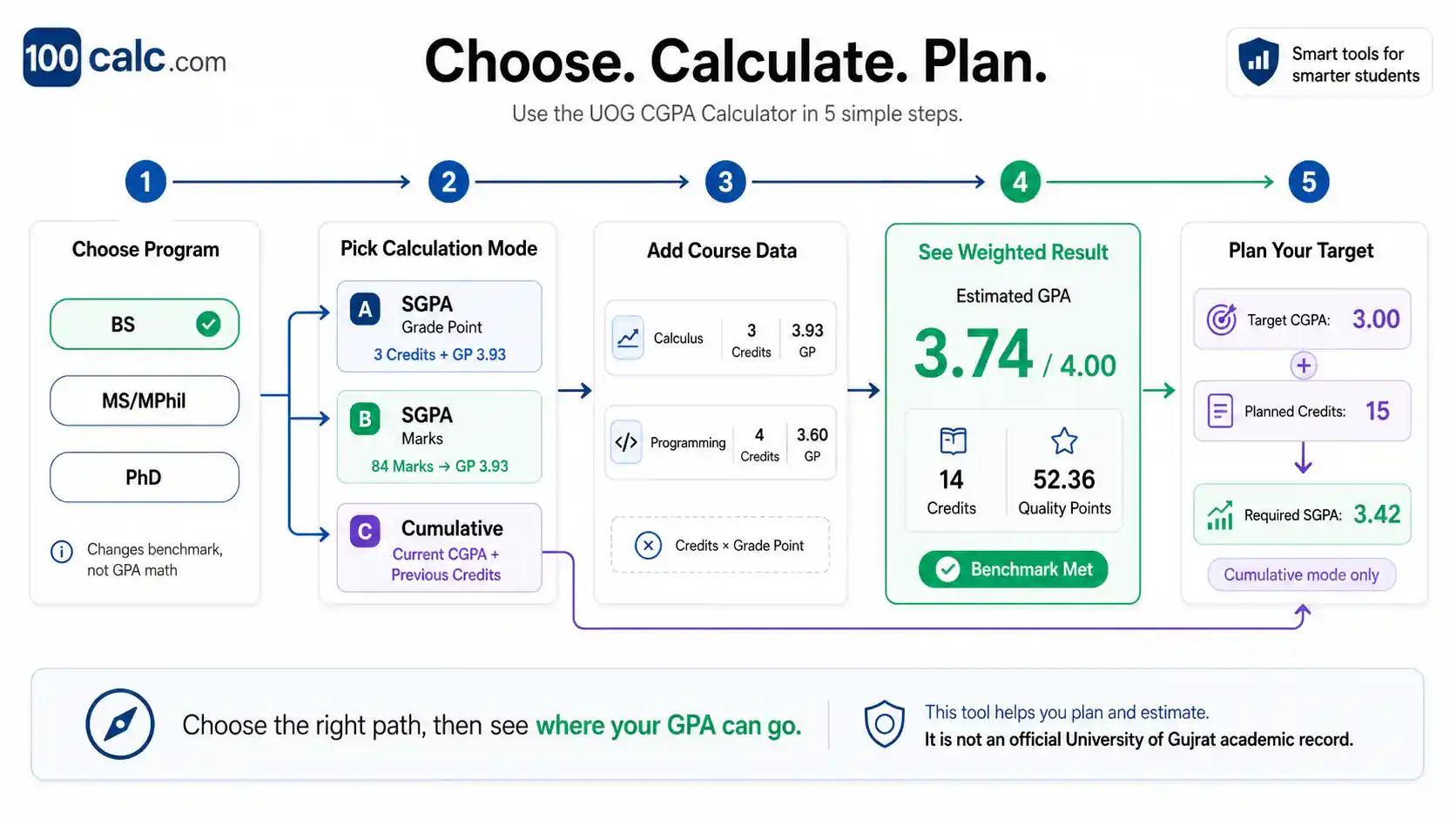
Choose Your Degree Program
Select BS, MS/MPhil, or PhD before calculating. This choice does not change the GPA math. It changes the academic benchmark shown with your result. Your courses, credit hours, and grade points still use the same weighted calculation for every program.
Select the Right Calculation Mode
Choose SGPA (Grade Point) when you know each course grade point. Use SGPA (Marks) when you have whole-number marks from 0 to 100. Select Cumulative when adding a new semester to an existing CGPA and previous credit total. UOG currently lists its Revised Semester System Rules 2025.
Enter Your Course Details
Add the credit hours for each course. Enter a grade point from 0.00 to 4.00 in Grade Point mode, or whole-number marks in Marks mode. Course names are optional. Once a row is started, both required values must be completed before the calculator accepts it.
Calculate and Review Your Result
Run the calculation after completing your course rows. Grade Point mode weights the values you entered. Marks mode converts each whole-number mark to its stored UOG 2025 grade point before weighting it. The result shows your GPA or CGPA, total credits, quality points, and program benchmark.
Plan Your Future CGPA Target
Use the target planner only after a Cumulative calculation. Enter the CGPA you want and the number of planned credits. The calculator uses your updated quality points and total credits to estimate the semester GPA needed. A required result above 4.00 means that target cannot be reached within those planned credits.
Quick Example to Test
Try these sample values in the UOG CGPA Calculator:
- Degree Program: BS (Undergrad)
- Calculation Mode: SGPA (Marks)
- Course 1: 3 credit hours, 84 marks
- Course 2: 3 credit hours, 78 marks
- Course 3: 3 credit hours, 71 marks
- Course 4: 3 credit hours, 65 marks
Result:
Your estimated semester GPA is 3.26 on the 4.00 scale.
The calculator converts the marks to these UOG grade points:
- 84 marks = 3.93
- 78 marks = 3.53
- 71 marks = 3.07
- 65 marks = 2.50
That gives 39.09 quality points across 12 credit hours.
For a BS student, this result is above the calculator’s 1.50 semester reference. It reflects only these entered courses, not your full cumulative CGPA.
Now enter your own course marks and credit hours to check your estimated semester GPA.
Accuracy Behind the UOG CGPA Calculator
The UOG CGPA Calculator uses credit-weighted GPA logic with the detailed UOG mark-to-grade-point mapping built into the tool. It keeps semester GPA and cumulative CGPA separate, checks invalid entries, and limits results to the 4.00 scale. UOG currently lists its Revised Semester System Rules 2025 for semester students.
Key Features & Benefits
- Credit-weighted results: Courses with more credit hours have more impact on the final GPA.
- UOG marks mapping: Whole-number marks use the calculator's detailed mark-specific grade points.
- Separate GPA modes: Semester GPA and updated cumulative CGPA stay clearly separated.
- Input validation: Missing, incomplete, or out-of-range course values are blocked before calculation.
- Target planning: Cumulative mode estimates the future SGPA needed for a chosen CGPA target.
Technical Process
Input Capture
The system checks credit hours, grade points, marks, and current CGPA before using them in the calculation.
Logic Processing
Valid values pass through the selected GPA mode, with credit weighting and the stored UOG marks mapping applied where needed.
Result Output
The final value is limited to the 4.00 scale, shown to two decimals, and matched with the selected program benchmark.
How the UOG CGPA Calculator Formula Works (Complete Breakdown)
The UOG CGPA Calculator uses credit-weighted GPA math. Each course affects the result based on its credit hours and grade point. Marks mode converts whole-number marks through the UOG grade-point table used by this calculator. Cumulative mode combines your existing CGPA, previous credits, and new course results.
Semester GPA Formula
Semester GPA needs to preserve the weight of courses with different credit loads. A short course should not influence the result as much as a course carrying several credits. This part of the calculation keeps those differences intact before producing one semester score.
Formula
Course Quality Points = Course Credits × Grade Point Total Quality Points = Sum of all Course Quality Points Semester GPA = Total Quality Points ÷ Total Semester Credits
This calculation gives more weight to courses with more credit hours. A 4-credit course can affect your semester GPA more than a 2-credit course when their grade points differ.
Variables Used
The values here serve different jobs. Grade point and course credits describe one subject, while quality points turn those values into a weighted contribution. Semester credits bring all completed course rows together for the final GPA calculation.
Grade Point
Grade Point is the numeric value linked to your course result. Grade Point mode accepts values from 0.00 to 4.00. In Marks mode, the calculator gets this value from its UOG marks-to-grade-point table.
Course Credits
Course Credits show the weight of each course. Higher-credit courses contribute more to your semester GPA because they produce more quality points at the same grade point.
Quality Points
Quality Points are the weighted value of a course. Multiply its credit hours by its grade point to get this number.
Semester Credits
Semester Credits are the total credit hours from all courses included in the calculation. The calculator divides total quality points by this value to find your semester GPA.
UOG GPA From Marks
Marks mode accepts whole-number marks from 0 to 100. It does not place every five marks into one broad grade-point band.
The calculator maps each valid mark to its configured UOG grade point before applying credit-hour weighting.
UOG Marks to Grade Point Examples
| Marks | Grade Point |
|---|---|
| 85 to 100 | 4.00 |
| 84 | 3.93 |
| 80 | 3.67 |
| 79 | 3.60 |
| 75 | 3.33 |
| 70 | 3.00 |
| 65 | 2.50 |
| 60 | 2.00 |
| 55 | 1.50 |
| 50 | 1.00 |
| Below 50 | 0.00 |
Marks between the listed examples also use their own stored grade points. The calculator then applies the same weighted GPA method used in Grade Point mode.
Updated CGPA Formula
Cumulative mode adds your new semester to the academic history you enter. It rebuilds the quality points represented by your current CGPA, adds the new course quality points, and divides the combined total by all included credits.
Formula
Previous Quality Points = Current CGPA × Previous Credits New Quality Points = Sum of (New Course Credits × New Grade Point) Combined Quality Points = Previous Quality Points + New Quality Points Combined Credits = Previous Credits + New Semester Credits Updated CGPA = Combined Quality Points ÷ Combined Credits
Variables Used
These variables keep past and new coursework separate until the final calculation. Current CGPA and previous credits describe your starting record. New quality points and semester credits describe the work being added. The combined totals connect both parts without giving either side artificial weight.
Current CGPA
Current CGPA is your cumulative GPA before adding the new semester. The calculator accepts values from 0.00 to 4.00.
Previous Credits
Previous Credits are the attempted credit hours already represented by your current CGPA. A larger previous credit total usually makes your cumulative result change more slowly.
Previous Quality Points
Previous Quality Points are reconstructed from your current CGPA and previous credits. This gives the calculator a weighted starting point for the cumulative calculation.
New Quality Points
New Quality Points come from the courses you add in Cumulative mode. Each course contributes its credit hours multiplied by its grade point.
New Semester Credits
New Semester Credits are the total credits from the new courses being added to your academic record.
Combined Credits
Combined Credits include both your previous attempted credits and the credits from the new semester. This total controls the final weighting of the updated CGPA.
Target CGPA Formula
The Semester Target Simulator works only after a Cumulative calculation. It estimates the semester GPA needed across your planned credits to reach the CGPA target you enter.
Formula:
Required Future Quality Points = Target CGPA × (Current Total Credits + Planned Credits) Required SGPA = (Required Future Quality Points - Current Quality Points) ÷ Planned Credits
Target Variables
These values describe a future academic scenario. Target CGPA sets the goal. Current totals establish the starting position. Planned credits determine how much new coursework can influence that position. Required SGPA shows the semester performance needed for those values to meet mathematically.
Target CGPA
Target CGPA is the cumulative GPA you want to reach. The calculator accepts a target from 0.00 to 4.00.
Current Total Credits
Current Total Credits are all credits already included in your updated cumulative result.
Current Quality Points
Current Quality Points are the weighted points behind your updated CGPA. The target calculation measures how many more points are needed to reach your goal.
Planned Credits
Planned Credits are the future credit hours you expect to complete. They determine how much room you have to earn the remaining quality points.
Required SGPA
Required SGPA is the estimated semester GPA needed across your planned credits to reach the target CGPA.
Target Outcomes
- Required SGPA above 4.00: The target cannot be reached within the planned credits.
- Required SGPA at or below 0.00: The target is already secured mathematically.
- Required SGPA from 0.01 to 4.00: This is the estimated GPA needed across the planned credits.
Formula Clarification
Do not average semester GPAs without considering credit hours. A semester with more credits should carry more weight in the cumulative result.
Grade points and quality points are also different. A grade point shows course performance. Quality points combine that grade point with the course credit weight.
The calculator does not use a generic CGPA × 25 conversion to estimate percentage. Percentage conversion rules can differ, so this tool keeps GPA and CGPA calculations on the 4.00 scale.
Semester GPA and cumulative CGPA should not be treated as the same result. Semester GPA covers the courses entered for one term. Updated CGPA includes your previous academic history.
A small difference from your official academic record is still possible. Your current CGPA may already be rounded. Rebuilding previous quality points from that rounded value can slightly change the estimated result.
How Do You Calculate UOG CGPA?
To calculate UOG CGPA, multiply each course grade point by its credit hours, add the quality points, then divide by total credits. For an updated CGPA, combine your previous quality points with the new semester before dividing by all credits included in the calculation.
What Semester GPA Do These UOG Grade Points Produce?
A student has four courses with different credit hours and grade points. This example uses SGPA (Grade Point) mode.
Input
- Data Structures: 3 credits, 3.87 grade point
- Operating Systems: 4 credits, 3.20 grade point
- Discrete Mathematics: 3 credits, 2.90 grade point
- Communication Skills: 2 credits, 4.00 grade point
Process
Data Structures = 3 × 3.87 = 11.61
Operating Systems = 4 × 3.20 = 12.80
Discrete Mathematics = 3 × 2.90 = 8.70
Communication Skills = 2 × 4.00 = 8.00
Total Quality Points = 41.11
Total Credits = 12
Semester GPA = 41.11 ÷ 12 = 3.4258
Result
- Estimated Semester GPA: 3.43
- Total Credits: 12
- Quality Points: 41.11
Meaning
The 4-credit Operating Systems course carries more weight than the 2-credit Communication Skills course. Course credit hours matter as much as the grade point when building the final semester GPA.
How Much Can One Failed 4-Credit Course Affect UOG GPA?
This case shows why the credit value of a low-scoring course matters. Use SGPA (Marks) mode with these whole-number marks.
Input
- Database Systems: 4 credits, 49 marks
- Programming: 3 credits, 84 marks
- Statistics: 3 credits, 78 marks
- Technical Writing: 2 credits, 72 marks
The calculator maps the marks to:
- 49 marks = 0.00 grade point
- 84 marks = 3.93
- 78 marks = 3.53
- 72 marks = 3.13
Process
Database Systems = 4 × 0.00 = 0.00
Programming = 3 × 3.93 = 11.79
Statistics = 3 × 3.53 = 10.59
Technical Writing = 2 × 3.13 = 6.26
Total Quality Points = 28.64
Total Credits = 12
Semester GPA = 28.64 ÷ 12 = 2.3867
Result
- Estimated Semester GPA: 2.39
- Total Credits: 12
- Quality Points: 28.64
Meaning
The failed course contributes four credits but no quality points. Its higher credit weight pulls the semester result down even though the other three courses have stronger scores.
How Much Can a Strong Semester Raise a 2.45 CGPA?
This example uses Cumulative mode. The student already has 48 attempted credits and wants to see how a new 12-credit semester changes the current CGPA.
Input
- Current CGPA: 2.45
- Previous Credits: 48
New courses:
- Course 1: 3 credits, 3.80 grade point
- Course 2: 4 credits, 3.53 grade point
- Course 3: 3 credits, 3.00 grade point
- Course 4: 2 credits, 2.40 grade point
Process
Previous Quality Points = 2.45 × 48 = 117.60
New Course Quality Points:
3 × 3.80 = 11.40
4 × 3.53 = 14.12
3 × 3.00 = 9.00
2 × 2.40 = 4.80
New Quality Points = 39.32
Combined Quality Points = 117.60 + 39.32 = 156.92
Combined Credits = 48 + 12 = 60
Updated CGPA = 156.92 ÷ 60 = 2.6153
Result
- Estimated Updated CGPA: 2.62
- Previous CGPA: 2.45
- Updated CGPA: 2.62
- Total Credits: 60
- Quality Points: 156.92
Meaning
The 12-credit semester raises the estimated CGPA by about 0.17 points. Previous credits still carry most of the cumulative weight, so CGPA usually moves more slowly as completed credits grow.
What SGPA Is Needed to Raise a 2.69 CGPA to 2.90?
This example shows the Semester Target Simulator after a Cumulative calculation.
Start with:
- Current CGPA: 2.62
- Previous Credits: 72
Add these courses:
- 3 credits at 3.67
- 3 credits at 3.33
- 3 credits at 2.90
- 3 credits at 2.50
The cumulative calculation produces:
- Combined Quality Points: 225.84
- Combined Credits: 84
- Estimated Updated CGPA: 2.69
Now enter:
- Target CGPA: 2.90
- Planned Credits: 18
Process
Required Future Quality Points =
2.90 × (84 + 18)
Required Future Quality Points =
2.90 × 102 = 295.80
Quality Point Gap =
295.80 – 225.84 = 69.96
Required SGPA =
69.96 ÷ 18 = 3.8867
Result
- Required SGPA: 3.89
Meaning
The student needs about a 3.89 SGPA across the planned 18 credits to reach the 2.90 target under these entered values. Reducing the planned credits would make the required semester GPA even harder to reach.
Use Your Own UOG Course Details
Choose the mode that matches the information you have. Use Grade Point mode for numeric grade points, Marks mode for whole-number course marks, or Cumulative mode when adding new courses to an existing CGPA.
Enter every course with its correct credit hours. Small grade differences matter more in higher-credit courses, while older completed credits continue to affect cumulative results.
UOG CGPA Calculator Result Benchmarks by Program
The UOG CGPA Calculator uses different benchmarks for BS, MS/MPhil, and PhD results. Semester GPA and updated CGPA should not be judged by one universal range. Compare your result with the benchmark for your selected program and result type, then use the gap to decide what to improve next.
| Result Check | Status | BS | MS/MPhil | PhD |
|---|---|---|---|---|
| Updated CGPA at or above cumulative benchmark | Meets Benchmark | 2.00 or higher | 2.50 or higher | 3.00 or higher |
| Semester GPA at or above semester reference | Meets Semester Reference | 1.50 or higher | 2.00 or higher | 2.50 or higher |
| Below the applicable reference | Needs Review | Below 1.50 SGPA or below 2.00 CGPA | Below 2.00 SGPA or below 2.50 CGPA | Below 2.50 SGPA or below 3.00 CGPA |
Heads-up: Use the semester reference for an SGPA result and the cumulative benchmark for an updated CGPA. These are calculator comparison points, not an automatic decision about probation, continuation, or degree status. Confirm your official standing with UOG records and your program rules.
Interpretation
Read the result type first. A BS semester GPA of 1.70 sits above the calculator’s 1.50 semester reference. A BS updated CGPA of 1.70, however, sits below its 2.00 cumulative benchmark.
The same distinction applies to MS/MPhil and PhD students. This is why one universal label such as “good GPA” or “bad GPA” would be less useful. Compare SGPA with the semester reference and updated CGPA with the cumulative benchmark
Pro Tip
If your updated CGPA is below the selected benchmark, use the Semester Target Simulator to test realistic planned credit loads.
A required SGPA above 4.00 means the target cannot be reached within those entered credits. In that case, test more planned credits or work toward a smaller CGPA increase first.
You Might Also Find These Helpful
GPA 18
Will your grades get you into TUM? Use our German GPA Calculator to convert your CGPA or percentage instantly. Find your exact DAAD equivalent…
Try calculatorUse the High School GPA Calculator to check weighted and unweighted GPA, include honors or AP classes, track cumulative GPA, and see what GPA…
Try calculatorIIUI CGPA Calculator estimates GPA and cumulative CGPA from IIUI grades, marks, and credit hours. Use it as an IIUI GPA calculator on a…
Try calculatorStop guessing! Use our updated Karachi University CGPA Calculator to instantly check your semester score, avoid probation, and catch scrutiny grade bumps now.
Try calculatorUse the NUST CGPA Calculator to estimate semester GPA, updated CGPA, quality points and HEC percentage range from your NUST grades and credit hours.
Try calculatorWorried about a low LMS score? Use our live UAF CGPA Calculator to instantly predict your exact GPA, plan retakes to avoid probation, and…
Try calculatorUCP CGPA Calculator estimates semester GPA and CGPA from UCP grades and credit hours. Check grade points, grading scale, and your calculated result.
Try calculatorUse the UET CGPA Calculator for Lahore, Taxila, or Peshawar. Check SGPA, updated CGPA, percentage estimate, and the score needed before results arrive.
Try calculatorUMT CGPA Calculator estimates semester GPA, updated CGPA, and the SGPA needed for your target using UMT grade points and credit hours. Check your…
Try calculatorStop guessing your academic rank. Use our Unweighted GPA Calculator to instantly convert percentages to a 4.0 scale, check your rigor, and set exact…
Try calculatorCalculate UOL GPA, SGPA and CGPA using the University of Lahore grade scale. Enter courses or paste supported grade and credit-hour data from SAP/SIS.
Try calculatorUse our weighted GPA calculator to check your 5.0 scale GPA, compare weighted vs unweighted GPA, and see how AP or Honors classes raise…
Try calculatorFrequently Asked Questions (FAQs)
Can I use values from UOG CMS in the CGPA calculator?
Yes. Manually enter the credit hours, numeric grade points, current CGPA, and attempted credits shown in your UOG record. The calculator does not paste, import, or sync CMS data. Using the values exactly as they appear in your record helps keep the estimated result as close as possible.
Can I enter UOG letter grades instead of numeric grade points?
No. Grade Point and Cumulative modes use numeric grade points from 0.00 to 4.00. If you only have course marks, use Marks mode instead. Marks must be whole numbers from 0 to 100, so values such as 78.5 are not accepted.
If your academic record already shows a numeric grade point, use that value rather than guessing one from a letter grade.
Can the UOG CGPA Calculator handle failed or repeated courses?
A failed course can be entered with its credit hours and a 0.00 grade point, or with a below-50 whole mark in Marks mode. Repeated-course treatment is not applied automatically. For a retake, use the credit and grade-point values that match the academic record you want to estimate.
This avoids assuming how an older attempt should be treated in your official CGPA.
Can I calculate an older UOG GPA or CGPA with this calculator?
Yes, when the older academic record shows numeric grade points and course credit hours. Grade Point mode can use those recorded values directly. Use more care with Marks mode because grading rules can change. For older coursework, the grade points printed on your academic record are the safer inputs.
Do I need to download a UOG CGPA calculator app?
No. The UOG CGPA Calculator works directly in your web browser, so no app, APK, or software installation is required. Enter your semester or cumulative values online and review the estimate there. The calculator remains separate from UOG systems and does not change your university record.
Questions?
We had love to hear from you! Whether you are reporting an issue, suggesting a new calculator, or exploring collaboration opportunities — we are here to help. Every message helps us make 100calc smarter, faster, and more helpful for everyone.
Why People Trust 100calc
At 100calc.com, we focus on accuracy, speed, and trust. Every calculator we create is designed to give reliable, instant, and easy-to-understand results you can truly depend on.