
High School GPA Calculator
A High School GPA Calculator helps you calculate your GPA using grades, credits, and class type. Enter each course grade. Add honors or AP weight if needed. The calculator then shows your unweighted GPA and weighted GPA on a 4.0 scale in seconds.
This high school GPA calculator also estimates your cumulative GPA if you include your current GPA and past credits. Many students use it to track their semester GPA, overall high school GPA, or final GPA before college applications.
You can also switch to Hit My Target mode. This feature shows the GPA you must earn in remaining classes to reach your goal. Many U.S. high schools follow a 4.0 GPA scale for unweighted GPA, while honors and AP classes may raise the weighted GPA above 4.0.
Quick Facts
- Calculates unweighted GPA and weighted GPA
- Works as a semester GPA calculator for high school
- Supports honors (+0.5) and AP or college (+1.0) weighting
- Can estimate cumulative high school GPA
- Includes a target GPA planner
- Works for 4.0 GPA scale and weighted 5.0 scale systems
- Updated Mar 19, 2026
- Reviewed by Academic Grading Systems Editor
High School GPA Calculator
Calculate your unweighted and weighted GPA using custom grade points, or reverse-engineer your target.
Your Academic Profile
Based on your current semester grades
- Semester Credits
- 0
- Total Credits Earned
- 0
- Cumulative GPA (Unweighted)
- 0.00
- Cumulative GPA (Weighted)
- 0.00
How do you calculate GPA in high school?
A high school GPA calculator helps you calculate your grades in a clear way before you submit transcripts or plan your target GPA. This tool works for both weighted and unweighted GPA. It also helps if you want to estimate your cumulative high school GPA or figure out the GPA you need next.
You can use it as a semester GPA calculator for high school, a cumulative GPA calculator, or a target GPA planner. Just choose the correct mode. Then enter your classes, grade points, credits, and class type. The calculator will match your inputs to the correct result panel.
Calculator Area
This calculator has two modes.
1. Calculate GPA
Use this mode when you want to calculate your current semester GPA or update your cumulative GPA.
2. Hit My Target
Use this mode when you already know your current GPA and want to see what GPA you must earn in your remaining credits.
Expected Inputs
Mode: Calculate GPA
In standard mode, you can enter the following:
- Optional prior cumulative GPA
Add your previous cumulative GPA if you want to include older grades in the final result. - Optional past credits
Add the total credits you already completed with that prior GPA. - Course rows
Each class row includes:- Course name
- Grade points
- Credits
- Class type:
- Regular
- Honors
- AP or College
The calculator also includes quick fill grade buttons like A, B+, C, and F. These make data entry faster.
Mode: Hit My Target
In target mode, you enter:
- Current cumulative GPA
- Past credits earned
- Target GPA goal
- Credits remaining
This mode works like a reverse calculator. It tells you the GPA needed in your remaining classes to hit your goal.
Output Fields
After you click Calculate Full Report, the calculator shows results that match your selected mode.
Standard GPA Mode Results
- Live semester GPA
A running GPA preview appears while you enter classes. - Semester credits
The total credits from the classes you entered for this semester. - Total credits earned
This includes semester credits plus past credits if you entered prior GPA data. - Cumulative GPA (unweighted)
Your overall GPA without extra honors or AP weight. - Cumulative GPA (weighted)
Your overall GPA with honors and AP weight added.
Target Mode Results
- Needed GPA in remaining credits
The calculator shows the GPA you must average in your remaining classes to hit your target.
Sticky Result Bar
After calculation, a sticky result bar appears for quick viewing.
- In standard mode, it shows:
- Unweighted GPA
- Weighted GPA
In target mode, it shows:
- Needed GPA
This makes it easy to check your main result without scrolling back through the page.
What this high school GPA calculator is best for
You can use this tool if you want to:
- calculate high school GPA
- estimate weighted high school GPA
- check unweighted GPA on a 4.0 scale
- update your cumulative high school GPA
- plan your final GPA in high school
- see what GPA you need to reach a target before graduation
This makes the page useful for students, parents, and counselors who want a simple gpa calculator for high school with results that are easy to understand.
What Does Your High School GPA Result Mean?
Your high school GPA calculator result shows how well you performed across your courses during a semester or across multiple years. The calculator displays two main values. These are unweighted GPA and weighted GPA. Both help colleges understand your academic performance.
Unweighted GPA uses the standard 4.0 scale. All classes follow the same scale. Regular, Honors, and AP classes count the same in this system. For example, an A equals 4.0 and a B equals 3.0.
Weighted GPA adds extra points for advanced classes. Honors courses usually add +0.5 GPA points. AP or college level courses may add +1.0 GPA points. Because of this adjustment, the weighted GPA can rise above 4.0. Many high schools report both values on transcripts.
Colleges often review both scores. The Common App states that if a school reports both weighted and unweighted GPA, students should report the weighted GPA. This helps admission teams see how challenging your classes were.
Tracking your GPA each semester helps you see your progress. It also helps you plan your grades before college applications.

Example Output Interpretation
Example 1:
- Unweighted GPA: 3.55
- Weighted GPA: 3.95
Meaning
Your grades are strong on the 4.0 GPA scale. The weighted value is higher because you completed advanced courses such as Honors or AP classes. Colleges often view this as strong academic preparation.
Example 2
- Unweighted GPA: 3.20
- Weighted GPA: 3.75
Meaning
Your grades fall in the good performance range. The higher weighted GPA shows that advanced courses improved your academic average. This often happens when students take challenging classes while maintaining solid grades.
These results help students answer common questions such as:
- what is my GPA on a 4.0 scale
- how to calculate GPA in high school
- how weighted GPA affects college applications
By checking your GPA regularly with a high school GPA calculator, you can track progress, plan future grades, and stay on track for college goals.
Explore More Calculators
Use the CGPA Calculator to calculate CGPA from GPA or SGPA, convert CGPA to percentage or 4.0 GPA, and plan your target CGPA. Works…
Try calculatorCalculate your GPA instantly using 4.0, percentage, or university scales. Accurate results with credits, conversions, and global GPA comparison.
Try calculatorApplying to Germany? Use our free CGPA to German Grade Calculator. Convert your 10.0 or 4.0 scale instantly to see if you meet the…
Try calculatorUse this college GPA calculator to check semester, cumulative, and major GPA fast. Add grades, credits, retakes, and pass failed courses in one place.
Try calculatorUse the COMSATS CGPA Calculator to check semester SGPA, updated CGPA, required final marks, and the GPA needed to reach your academic target in…
Try calculatorFAST CGPA Calculator estimates your SGPA, updated CGPA, repeat-course impact, and required next GPA so you can plan your academic recovery.
Try calculatorHow to Calculate High School GPA Using the GPA Calculator
Using the high school GPA calculator takes only a minute. This tool helps you calculate semester GPA, cumulative GPA, weighted GPA, or target GPA based on your grades and credits. Follow these steps to calculate your high school GPA on a 4.0 scale or weighted scale.
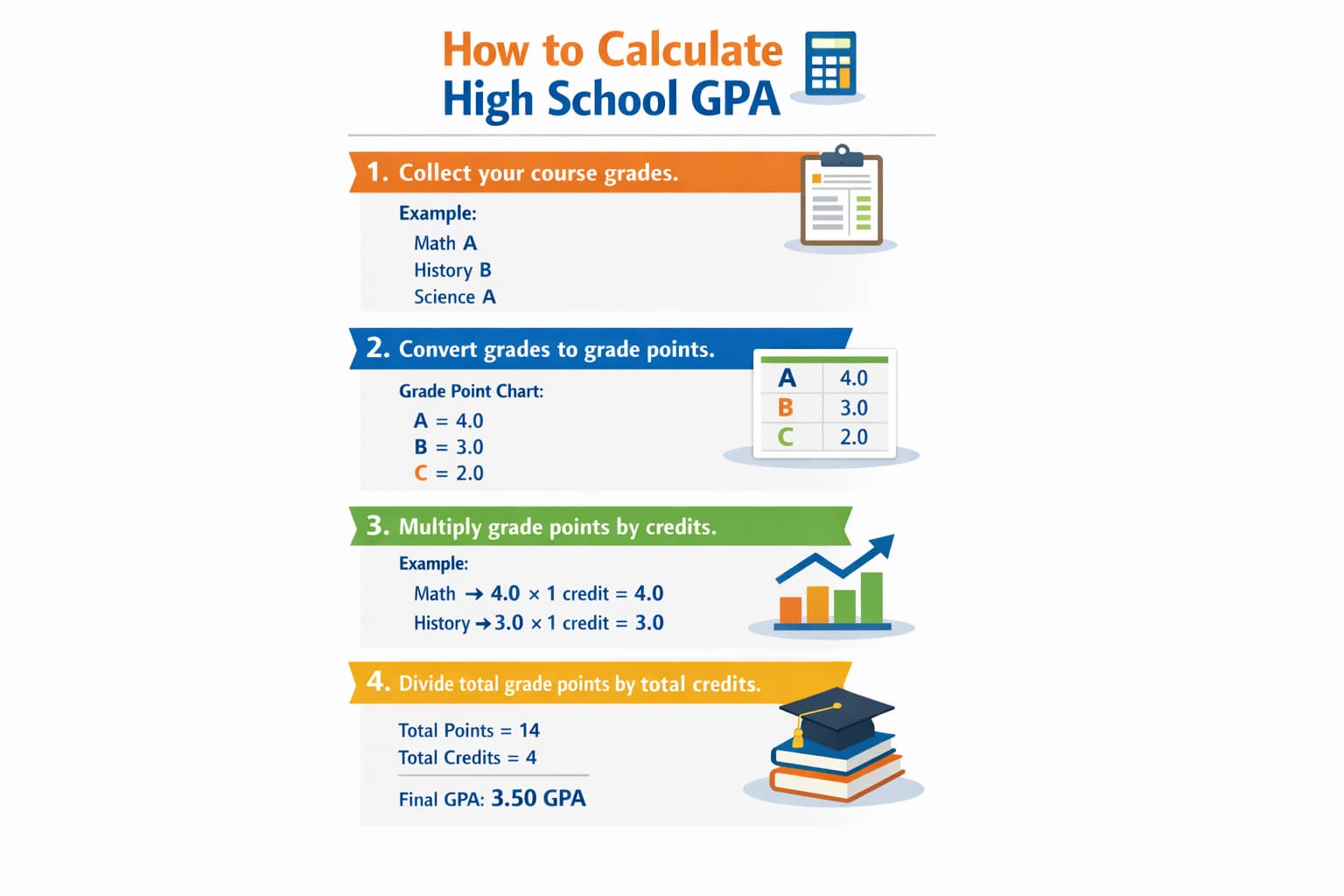
Choose Calculate GPA or Hit My Target
Start by selecting the calculation mode. Choose Calculate GPA if you want to find your semester GPA or cumulative GPA from your classes. Choose Hit My Target if you want to estimate the GPA you must earn in future classes.
Add your class grade points and credits
Enter each course you completed during the semester. Add the grade points and credit value for every class. The calculator uses these numbers to compute your high school GPA based on total grade points and credits.
Choose Regular, Honors, or AP weighting
Next choose the class type for each subject. Regular classes follow the standard 4.0 GPA scale. Honors classes usually add +0.5 GPA weight. AP or college courses may add +1.0 weight. This allows the calculator to estimate your weighted GPA correctly.
Add prior GPA for cumulative results
If you want a cumulative GPA result, enter your current GPA and past credits earned. This step helps the high school cumulative GPA calculator combine previous semesters with your new grades.
Click calculate and review your GPA
Press the Calculate button to see your results. The tool instantly displays your semester GPA, weighted GPA, unweighted GPA, and total credits used. If you use target mode, it also shows the GPA required in remaining classes.
Example for testing
Try this example to see how the high school GPA calculator works
Class 1 GPA: 4.0
Credits: 1Class 2 GPA: 3.0
Credits: 1Class 3 GPA: 3.7
Credits: 1
Total grade points become 10.7. And total credits become 3.
10.7 ÷ 3 = 3.57 GPA
Result:
Your semester GPA becomes 3.57 on the 4.0 scale. This score shows strong academic performance in most high school grading systems.
Now enter your own grades, credits, and class types to calculate your high school GPA, weighted GPA, or cumulative GPA instantly.
How the High School GPA Calculator Formula Works (Complete Breakdown)
Understanding the high school GPA formula helps you see how schools calculate your academic average. Most high schools in the United States calculate GPA using grade points and course credits. Classes with more credits affect your GPA more. Because of this, higher credit courses have a stronger impact on your final GPA.
A high school GPA calculator follows the same rule. It multiplies grade points by credits. Then it divides the total points by the total credits. This method calculates both unweighted GPA and weighted GPA. According to many academic grading systems, GPA works as a weighted average of grade points based on credit hours.
Unweighted High School GPA Formula
Unweighted GPA treats every class the same. Regular, Honors, and AP courses all use the standard 4.0 GPA scale.
Formula:
Unweighted GPA = Total Grade Points ÷ Total Credits
This formula adds all grade points first. Then it divides the result by the number of credits taken.
Example:
					Course 1 grade points = 4.0
Credits = 1

Course 2 grade points = 3.0
Credits = 1

Course 3 grade points = 3.7
Credits = 1

Step 1
Total grade points = 10.7

Step 2
Total credits = 3

Step 3
Unweighted GPA = 10.7 ÷ 3
Result
Unweighted GPA = 3.57
This result shows your GPA on the standard 4.0 scale used by many high schools.
Weighted High School GPA Formula
Weighted GPA adds bonus points for advanced courses. Honors classes usually add 0.5 points. AP or college courses may add 1.0 point. This system rewards students who take challenging classes.
Formula
Weighted GPA = Total (Grade Points + Weight Bonus) × Credits ÷ Total Credits
The calculator adds the bonus to the grade points first. Then it multiplies by credits. After that it divides the total by total credits.
Example
Class 1
Grade = A (4.0)
Type = Honors (+0.5)
Credits = 1
Class 2
Grade = B (3.0)
Type = Regular
Credits = 1
Class 3
Grade = A (4.0)
Type = AP (+1.0)
Credits = 1
Step 1
Adjusted grade points
4.5 + 3.0 + 5.0 = 12.5
Step 2
Total credits = 3
Step 3
Weighted GPA = 12.5 ÷ 3
Result
Weighted GPA = 4.17
This score shows how advanced courses raise a weighted high school GPA above 4.0.
Target GPA Formula
Some students want to know what GPA they must earn next semester. A target GPA calculator for high school helps estimate this.
Formula
					Needed GPA =
((Target GPA × Total Future Credits) − (Current GPA × Past Credits)) ÷ Remaining Credits
This formula compares your current GPA with your goal. Then it calculates the GPA needed in the remaining credits.
Example
- Current GPA = 3.20
- Past credits = 24
- Target GPA = 3.50
- Remaining credits = 12
Step 1
Target total grade points = 3.50 × 36 = 126
Step 2
Current grade points = 3.20 × 24 = 76.8
Step 3
Required points in future credits
126 − 76.8 = 49.2
Step 4
Needed GPA = 49.2 ÷ 12
Result
Needed GPA = 4.10
This means the target may be difficult on a 4.0 scale. Students may need stronger grades or additional credits to reach that goal.
Target CGPA Formula
The target CGPA calculator helps you estimate the GPA needed in your remaining semesters.
Formula
					Required GPA =
((Target CGPA × Total Credits After Completion) − (Current CGPA × Completed Credits)) ÷ Remaining Credits
This formula calculates how strong your future grades must be to reach your desired CGPA.
Example
Current CGPA = 3.10
Completed Credits = 60
Remaining Credits = 30
Target CGPA = 3.40
Required GPA = 3.98
This means you must average about 3.98 GPA in your remaining credits to reach your goal.
Variable Definitions
GPA
Grade Point Average. It measures your academic performance in high school.
Credits
Credit value assigned to each class. Some courses carry more weight in GPA calculations.
Weight Bonus
Extra points added for advanced classes.
- Regular = 0
- Honors = 0.5
- AP or College = 1.0
Current GPA
Your existing cumulative GPA before adding new courses.
Target GPA
The GPA you want to reach by the end of a semester or school year.
Understanding these formulas helps you see how a high school GPA calculator, weighted GPA calculator, or cumulative GPA calculator for high school works. Once you know the formula, you can also check your grades manually and verify your GPA results.

Another Example Calculation (Step-by-Step)
Real examples help you understand how a high school GPA calculator works. They show how grade points, credits, and class types affect both unweighted GPA and weighted GPA. These examples also show how a cumulative GPA calculator for high school or target GPA calculator produces results. Use these examples to compare your own grades and confirm that your GPA entries are correct.
Example 1. Weighted and Unweighted Semester GPA
This example shows how a weighted high school GPA calculator works. It compares the standard GPA with the weighted GPA that includes honors and AP bonuses.
Courses
- English
Grade Points = 4.0
Credits = 1
Class Type = Regular - Biology
Grade Points = 3.7
Credits = 1
Class Type = Honors (+0.5 weight) - Algebra
Grade Points = 3.3
Credits = 1
Class Type = AP (+1.0 weight)
Unweighted GPA Calculation
					Step 1
Add grade points

4.0 + 3.7 + 3.3 = 11.0

Step 2
Divide by total credits

11.0 ÷ 3 = 3.67
Weighted GPA Calculation
					Step 1
Add weight bonuses

English = 4.0
Biology = 4.2
Algebra = 4.3

Step 2
Add adjusted grade points

4.0 + 4.2 + 4.3 = 12.5

Step 3
Divide by total credits

12.5 ÷ 3 = 4.17
Output
Unweighted GPA = 3.67
Weighted GPA = 4.17
Meaning
Your standard GPA is strong. Advanced classes increased your weighted high school GPA above the 4.0 scale.
Example 2. Cumulative High School GPA Calculation
This example shows how a high school cumulative GPA calculator combines prior GPA with new classes.
Given:
- Prior GPA = 3.40
- Prior credits = 10
New semester courses
- Chemistry
Grade = A (4.0)
Credits = 1 - History
Grade = B+ (3.3)
Credits = 1 - Computer Science
Grade = A (4.0)
Credits = 1
					Step 1. Convert prior GPA into grade points

3.40 × 10 = 34 grade points

Step 2. Calculate new semester grade points

4.0 + 3.3 + 4.0 = 11.3

Step 3. Add totals

Total grade points = 45.3
Total credits = 13

Step 4. Calculate updated GPA

45.3 ÷ 13 = 3.48
Output
Updated cumulative GPA = 3.48
Meaning:
Your new grades raised your overall high school GPA slightly. Consistent A grades in future courses can push the cumulative GPA above 3.5.
Example 3. Hit My Target GPA Planner
This example shows how a final GPA calculator for high school estimates the GPA needed to reach a goal.
Given:
- Current GPA = 3.10
- Past credits = 12
- Target GPA = 3.25
- Remaining credits = 4
Calculation:
					Step 1. Calculate target total grade points

3.25 × 16 = 52

Step 2. Calculate current grade points

3.10 × 12 = 37.2

Step 3. Find required points

52 − 37.2 = 14.8

Step 4. Calculate required GPA

14.8 ÷ 4 = 3.70
Output
Needed GPA = 3.70
Meaning:
To reach your goal, you must average about 3.70 GPA in the remaining classes. This is close to an A average. Strong performance in the next semester can help you reach the target GPA.
These examples show how the high school GPA calculator, weighted GPA calculator, and cumulative GPA calculator for high school interpret grades and credits. They also show how advanced courses and future grades can change your final GPA.
Result Benchmarks and Ranges
What Is a Good High School GPA?
Your high school GPA helps show your academic performance over time. Colleges, counselors, and scholarship programs often look at GPA to understand how consistently you perform in class. A high school GPA calculator helps you place your result in a range so you know where you stand.
In most cases, a GPA close to 4.0 is excellent. A GPA in the 3.0 to 3.79 range is still strong for many colleges. A GPA below 2.0 may raise concern and can signal that improvement is needed. If you are asking, what is my GPA on a 4.0 scale, the table below gives a simple reference point.
| Range | Label | USA Guideline | India Guideline | Notes |
|---|---|---|---|---|
| 3.8–4.0 | Excellent | Strong high school GPA for selective colleges. | Comparable to a very high school average. | Shows consistent top grades across classes. |
| 3.0–3.79 | Good | Solid performance for many colleges. | Comparable to a good academic record. | Strong base, but higher grades can improve options. |
| 2.0–2.99 | Passing | Meets many school minimums but may need improvement. | Comparable to an average passing record. | May limit access to competitive programs. |
| Below 2.0 | At Risk | May raise academic concern or probation risk. | Often seen as below a strong academic standard. | Improvement is needed in future classes. |
Heads-up: GPA policies vary by school, district, and college application system. Always check your transcript and school handbook.
Interpretation
A GPA in the excellent range usually supports competitive college applications. A GPA in the good range is still strong and gives you many options. A passing GPA may meet graduation rules, but it can make selective admissions harder. An at risk GPA means you should improve grades soon, especially in core classes.
Pro Tip:
If your GPA is lower than you want, focus on classes with more credits or classes where you still have time to raise your grade. A high school cumulative GPA calculator or target GPA calculator can help you see what result you need next.
Tips & Planning Based on Your Result
Calculating your high school GPA is the first step. Planning how to improve it is the next step. This high school GPA calculator helps you see your current result. It also helps you decide what to do before the next term starts.

If Your GPA Is High
If your GPA is in the strong range, keep your habits steady. Good grades in future classes will protect your average. However, do not relax too much. One weak grade in an important class can still pull your cumulative high school GPA down.
If you take Honors or AP classes, your weighted GPA may rise faster. That can help your transcript look stronger. Still, keep in mind that some colleges may review grades on a standard scale too. So it is smart to track both weighted and unweighted GPA.
If Your GPA Is Mid Range
If your GPA is in the middle range, you still have room to improve. Focus first on classes where you can realistically raise your grade. Then pay close attention to classes with more credit value if your school uses credits in GPA calculations.
This is where a gpa calculator for high school becomes useful. It helps you test different grade outcomes before the semester ends. That way, you can see which classes matter most.
If Your GPA Is Low
If your GPA is lower than your goal, act early. Do not wait until the end of the term. Use the Hit My Target mode to estimate the GPA you need in your remaining classes. This gives you a clear number to work toward.
A low GPA does not always stay low. Strong grades in future courses can still raise your overall high school GPA. The key is to improve consistently instead of chasing one perfect result.
Smart Planning Tips
- Keep track of both weighted GPA and unweighted GPA if your school reports both.
- Use Hit My Target before each new term so you know what grades you need.
- Honors and AP classes can boost your weighted high school GPA, but only if you still earn strong grades in them.
- Review your GPA after every grading period. This helps you catch problems early.
- If your school uses equal course values, a high school GPA calculator without credits may still work well. If classes have different credit values, always include credits for a more accurate result.
These steps help you use your GPA as a planning tool, not just a score. When you check it often, you can make better choices about classes, workload, and academic goals.
You Might Also Find These Helpful
GPA 18
Will your grades get you into TUM? Use our German GPA Calculator to convert your CGPA or percentage instantly. Find your exact DAAD equivalent…
Try calculatorIIUI CGPA Calculator estimates GPA and cumulative CGPA from IIUI grades, marks, and credit hours. Use it as an IIUI GPA calculator on a…
Try calculatorStop guessing! Use our updated Karachi University CGPA Calculator to instantly check your semester score, avoid probation, and catch scrutiny grade bumps now.
Try calculatorUse the NUST CGPA Calculator to estimate semester GPA, updated CGPA, quality points and HEC percentage range from your NUST grades and credit hours.
Try calculatorWorried about a low LMS score? Use our live UAF CGPA Calculator to instantly predict your exact GPA, plan retakes to avoid probation, and…
Try calculatorUCP CGPA Calculator estimates semester GPA and CGPA from UCP grades and credit hours. Check grade points, grading scale, and your calculated result.
Try calculatorUse the UET CGPA Calculator for Lahore, Taxila, or Peshawar. Check SGPA, updated CGPA, percentage estimate, and the score needed before results arrive.
Try calculatorUMT CGPA Calculator estimates semester GPA, updated CGPA, and the SGPA needed for your target using UMT grade points and credit hours. Check your…
Try calculatorStop guessing your academic rank. Use our Unweighted GPA Calculator to instantly convert percentages to a 4.0 scale, check your rigor, and set exact…
Try calculatorUOG CGPA Calculator estimates semester GPA, updated CGPA, program benchmarks, and the SGPA needed to reach your target using credits, marks, or grade points.
Try calculatorCalculate UOL GPA, SGPA and CGPA using the University of Lahore grade scale. Enter courses or paste supported grade and credit-hour data from SAP/SIS.
Try calculatorUse our weighted GPA calculator to check your 5.0 scale GPA, compare weighted vs unweighted GPA, and see how AP or Honors classes raise…
Try calculatorCommon Mistakes to Avoid When Calculating CGPA
- Entering grade points without adding the correct class credits
- Mixing weighted and unweighted grade points in the same calculation row
- Using the wrong bonus value for Honors or AP classes
- Forgetting to include prior cumulative GPA when calculating overall GPA
- Assuming every college will use your school’s weighted GPA exactly as shown on your transcript

Frequently Asked Questions (FAQs)
What is a high school GPA calculator?
A high school GPA calculator is a tool that estimates your GPA from class grades, credits, and class type. It can calculate weighted GPA, unweighted GPA, cumulative GPA, and even the GPA you need to reach a target. This helps you track progress during the semester. It also helps you plan before report cards, transcripts, and college applications.
What is the difference between weighted and unweighted GPA?
Unweighted GPA uses the same 4.0 scale for every class. Weighted GPA adds extra value for harder classes such as Honors, AP, or dual enrollment courses. That is why weighted GPA can go above 4.0. Both scores matter. Unweighted GPA shows raw grades, while weighted GPA shows course difficulty too.
What is my GPA on a 4.0 scale?
Your GPA on a 4.0 scale depends on how your school records grades. Some schools already use a 4.0 scale. Others use weighted scales or percentage systems that must be converted before you can compare them. A high school GPA calculator can estimate this quickly. However, your school transcript remains the official source.
Is 75% a 3.0 GPA?
75% is not always a 3.0 GPA. The conversion depends on your school’s grading scale. In some schools, 75 percent may be closer to a 2.0 or 2.3. In others, it may convert differently. Always check your school handbook or transcript rules. Percentage and GPA are not universal across all schools.
Can I calculate high school GPA without credits?
Yes, you can calculate high school GPA without credits if every class counts equally. In that case, add all grade points together and divide by the number of classes. This works well for a simple GPA estimate. If classes have different credit values, use credits. That gives a more accurate result.
Should I report weighted or unweighted GPA on Common App?
You should report the GPA exactly the way your school shows it. If your school reports both weighted and unweighted GPA, application systems often ask you to follow the school record rather than guess or convert it yourself. So check your transcript first. Then enter the GPA in the same format your school uses.
How do colleges recalculate GPA?
Many colleges recalculate GPA using their own rules. They may focus on core academic classes only. They may also review certain grade levels more closely, such as 9th through 11th grade. Because of this, your school GPA and college recalculated GPA may look different. That difference is normal.
Can a high school GPA calculator show cumulative GPA?
Yes. A high school cumulative GPA calculator can combine your current GPA, past credits, and new semester grades. This gives you a better picture of your overall academic standing instead of only one semester. That is useful when you want to track progress over all four years of high school.
What GPA do I need to hit my target in high school?
The GPA you need depends on your current GPA, past credits, target GPA, and credits remaining. A target GPA calculator works backward and shows the average GPA you must earn in future classes. This is helpful when you are trying to improve your final GPA before graduation or college applications.
Questions?
We had love to hear from you! Whether you are reporting an issue, suggesting a new calculator, or exploring collaboration opportunities — we are here to help. Every message helps us make 100calc smarter, faster, and more helpful for everyone.
Why People Trust 100calc
At 100calc.com, we focus on accuracy, speed, and trust. Every calculator we create is designed to give reliable, instant, and easy-to-understand results you can truly depend on.