
UOL CGPA Calculator: Calculate GPA, SGPA and CGPA
The UOL CGPA Calculator helps University of Lahore students calculate semester SGPA, updated CGPA, pasted SAP grade results, and estimated retake impact. It uses credit hours and UOL grade points, not a simple grade average. W, I, S, and US stay outside GPA math. The percentage result is only an estimate and does not recover your original marks.
Your grades are not averaged equally. One high-credit course can move your result more than several smaller courses. Check which grades counted, test a repeat result, and see the SGPA needed for your next CGPA target. No app download or SAP login is needed.
Quick Facts
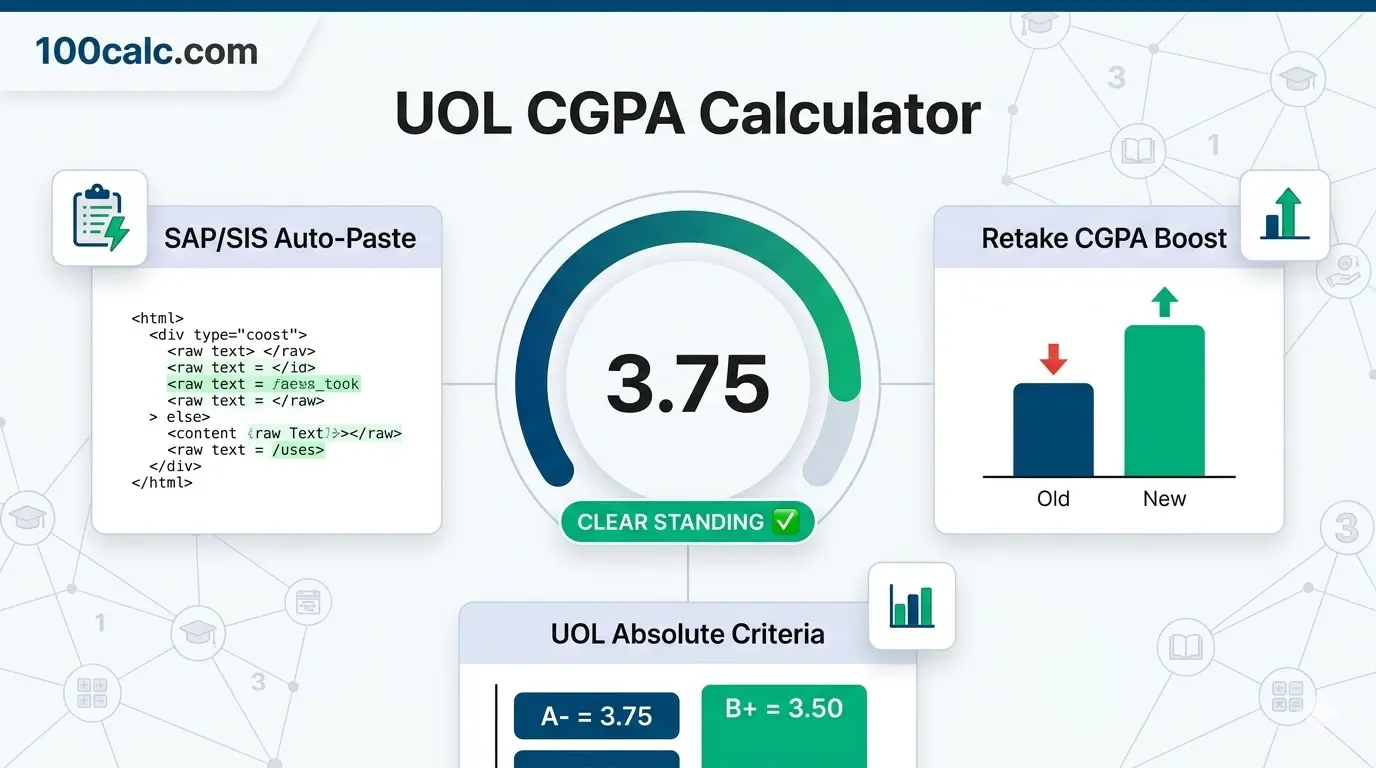
- A equals 4.00, A− equals 3.75, and B+ equals 3.50.
- SGPA covers one semester. CGPA includes your previous academic record.
- W, I, S, and US do not affect GPA-bearing credits.
- SAP Paste reads only the grade-credit text you provide.
- The percentage result is an estimate, not your exact original marks.
- Updated Jul 14, 2026
UOL CGPA Calculator (App Edition)
Calculate your UOL SGPA or CGPA by entering courses manually, pasting supported grade-credit data from SAP/SIS, or estimating a repeat-course result.
W, I, S and US are accepted as non-GPA statuses. They are excluded from credit-weighted GPA calculations.
Copy the grade and credit-hour text from your UOL SAP/SIS results, then paste it below. The calculator automatically detects supported grade-credit pairs.
No SAP login needed. This calculator does not connect to your SAP account. Its calculation script reads the text you paste into this box in your browser.
Estimate how replacing an eligible old grade with a higher grade could change your CGPA. Confirm repeat approval and grade replacement with UOL.
Provides an estimate from the calculator's grade-band mapping. It does not recover your original course marks or an official exact percentage.
Your UOL Score
Calculated via the absolute UOL grading scale.
Academic Breakdown
🎓 Target CGPA Planner
Estimate the SGPA needed across your planned credits to reach a selected cumulative CGPA target.
Is there a UOL GPA calculator app or APK to download?
You do not need to download a UOL GPA calculator app or APK. This calculator works in your mobile or desktop browser. To use the SAP/SIS paste mode, copy supported grade and credit-hour text from your portal and paste it into the calculator. The tool does not log in to or connect with your SAP account.
What is the UOL CGPA criteria and absolute grading scale?
The official uol cgpa criteria is mathematically unique. Unlike generic standard calculators, UOL awards a 3.75 for an A- and a 3.50 for a B+. To graduate, undergraduate students must maintain a minimum 2.00 CGPA, while MS/MPhil students must maintain a 2.50.
Can UOL CGPA be converted to an exact percentage?
Not from CGPA alone. The percentage mode gives an estimated reference from this calculator's grade-band mapping. It does not recover your original marks or provide an official exact UOL percentage.
Official UOL Grading System Explained
Every university follows its own unique academic rules. Specifically, the University of Lahore uses a strict absolute grading scale, which differs significantly from standard HEC relative curves. This official UOL grading system converts your exact marks percentage directly into specific letter grades. Furthermore, it assigns unique quality points to each bracket, such as awarding a 3.75 for an A- instead of the usual 3.67. Therefore, you can use the table below to cross-check your manual calculations or SAP/SIS portal results. Consequently, understanding these exact threshold rules helps you target merit scholarships and avoid academic probation effectively.
| Marks Percentage | Letter Grade | Grade Point (QP) | Status / Remarks | System Used |
|---|---|---|---|---|
| 85% – 100% | A | 4.00 | Excellent | Absolute Grading |
| 80% – 84.99% | A- | 3.75 | Very Good | Absolute Grading |
| 75% – 79.99% | B+ | 3.50 | Good | Absolute Grading |
| 70% – 74.99% | B | 3.00 | Above Average | Absolute Grading |
| 65% – 69.99% | C+ | 2.50 | Average | Absolute Grading |
| 60% – 64.99% | C | 2.00 | Satisfactory | Absolute Grading |
| 55% – 59.99% | D+ | 1.50 | Pass | Absolute Grading |
| 50% – 54.99% | D | 1.00 | Pass (Borderline) | Absolute Grading |
| Below 50% | F | 0.00 | Fail | Absolute Grading |
Important Note: This table reflects the official UOL absolute grading scale. Unlike standard relative scales that calculate an A- as 3.67, the University of Lahore awards a strict 3.75 for an A- and 3.50 for a B+. To calculate your semester SGPA, multiply your subject's credit hours by the exact Grade Point corresponding to your marks percentage.
The Strict Absolute Grading Scale
The University of Lahore uses a strict absolute grading system. Therefore, your performance does not depend on a class bell curve or other students. Instead, your raw marks percentage directly determines your final letter grade. For instance, scoring 85 percent or above guarantees a perfect A grade. Consequently, this transparent criteria removes any grading confusion at the end of the semester.
How UOL Quality Points Work
Your letter grade translates directly into official quality points. Next, the university uses these points to calculate your exact SGPA. An A grade gives you exactly 4.00 points. Meanwhile, a C grade gives you 2.00 points. Thus, you must multiply these specific quality points by your course credit hours. Ultimately, this simple math creates your official academic standing on the SAP UOL portal.
The Unique Decimal Trap (A- and B+)
Sometimes, generic tools will give you the wrong result because of unique decimals. In this case, standard calculators map an A- to a 3.67. However, the UOL grading system awards a strict 3.75 for an A- (80 percent marks). Additionally, a 75 percent score yields a 3.50 grade point (B+). Therefore, using the exact university decimals is crucial for finding your true UOL CGPA percentage.
Minimum Degree & Probation Rules
You must understand the minimum passing rules clearly to avoid academic probation. First, you need at least 50 percent marks to pass a single subject. This borderline score gives you a D grade (1.00 QP). However, undergraduate (BS) students need a 2.00 overall score to earn their degree. Furthermore, MS/MPhil students require a 2.50 minimum. As a result, simply getting D grades will put you on probation. You must aim higher to graduate successfully.
What Your UOL GPA or CGPA Result Means
Your UOL CGPA Calculator result shows your credit-weighted academic performance on a 4.00 scale. Its meaning depends on the mode you selected.
Semester SGPA covers one semester. Updated CGPA includes your previous record. SAP Paste uses only detected courses. Retake mode shows an estimated result after grade replacement.
Understanding Your Result
A higher number means stronger academic performance. Credit hours affect how much each course changes the result.
W, I, S, and US do not lower your score. The calculator removes them from GPA-bearing credits and quality points.
The percentage value is only an estimate. It does not show the exact marks earned in your courses.
A pasted SAP result may not be your full CGPA. Check the detected course count before trusting it.
Is Your Result Good or Bad?
UOL does not use one official “good” or “average” label for every student. Your degree level and academic goal matter more.
- Undergraduate below 2.00: Below the published minimum.
- Undergraduate at 2.00 or higher: Meets the minimum threshold.
- Graduate below 2.50: Below the MS or MPhil minimum.
- Graduate at 2.50 or higher: Meets the minimum threshold.
A score near the minimum leaves little room for another weak semester. A result above 3.00 gives you more breathing room.
Some scholarships use 3.00 or 3.50 targets. Rules vary by award and program. One score does not guarantee a fee waiver.
A low semester SGPA does not confirm probation by itself. Official standing depends on your cumulative record.
What You Should Do Next
- Use Cumulative CGPA mode before judging your academic standing.
- Check SAP if your pasted course count looks wrong.
- Test a higher grade in Retake ROI for an eligible course.
- Use the Target CGPA Planner to set your next SGPA goal.
Contact your department when the result falls below your degree threshold. The calculator cannot confirm an official academic decision.
Quick UOL CGPA Example to Test
Enter these values in Cumulative CGPA mode:
- Current CGPA: 3.10
- Completed credits: 45
- Course 1: 3 credits, A−
- Course 2: 3 credits, B+
- Course 3: 3 credits, B
- Course 4: 3 credits, C+
The UOL CGPA Calculator shows:
- Updated CGPA: 3.12
- Total credits: 57
- Quality points: 177.75
- Estimated percentage: 71.2%
This result raises the CGPA from 3.10 to 3.12. It meets both degree-level minimums. Scholarship status still depends on the student’s award rules.
Explore More Calculators
Use the CGPA Calculator to calculate CGPA from GPA or SGPA, convert CGPA to percentage or 4.0 GPA, and plan your target CGPA. Works…
Try calculatorCalculate your GPA instantly using 4.0, percentage, or university scales. Accurate results with credits, conversions, and global GPA comparison.
Try calculatorApplying to Germany? Use our free CGPA to German Grade Calculator. Convert your 10.0 or 4.0 scale instantly to see if you meet the…
Try calculatorUse this college GPA calculator to check semester, cumulative, and major GPA fast. Add grades, credits, retakes, and pass failed courses in one place.
Try calculatorUse the COMSATS CGPA Calculator to check semester SGPA, updated CGPA, required final marks, and the GPA needed to reach your academic target in…
Try calculatorFAST CGPA Calculator estimates your SGPA, updated CGPA, repeat-course impact, and required next GPA so you can plan your academic recovery.
Try calculatorHow to Use the UOL CGPA Calculator
The UOL CGPA Calculator follows a different process for each mode. It checks your entries, matches grades with grade points, removes excluded statuses, and weights each course by credit hours. The final screen then shows the result that fits the academic record you entered.
Choose the Right Calculation Mode
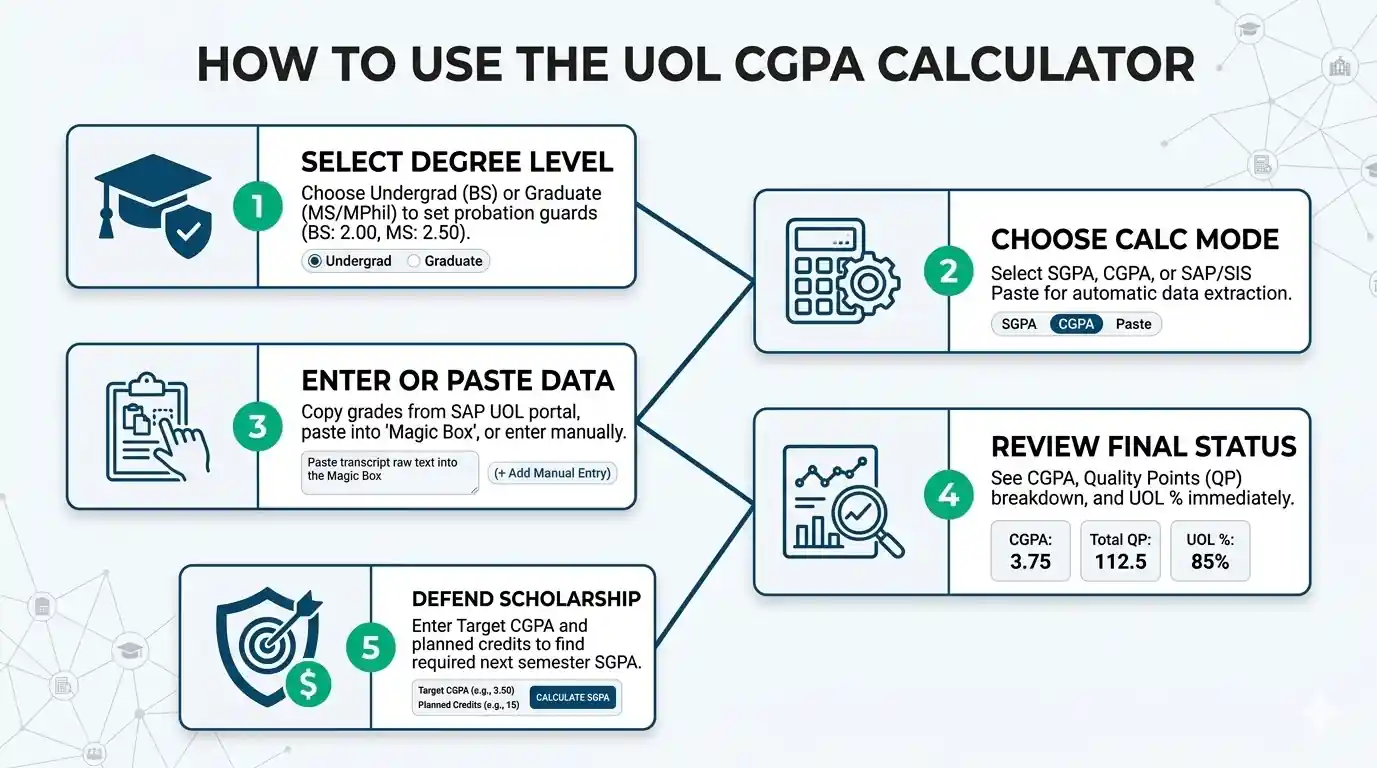
Select Semester SGPA for current courses only. Choose Cumulative CGPA to combine earlier history with a new semester. SAP Paste reads supported grade-credit pairs. Retake ROI tests a higher replacement grade. Percentage Estimate converts a CGPA into a rough grade-band reference.
Add the Required Academic Details
Enter each course grade and its credit hours. Cumulative mode also needs your current CGPA and completed credits. Retake mode needs the old grade, target grade, and course credits. The calculator blocks incomplete rows and values outside the accepted limits.
Match Grades With UOL Grade Points
Each letter grade receives its UOL point value. A equals 4.00, A− equals 3.75, and B+ equals 3.50. Manual values must stay between 0.00 and 4.00. W, I, S, and US remain outside the GPA calculation.
Build the Credit-Weighted Result
Higher-credit courses have more effect on the final score. The calculator combines each valid grade with its course credits. It removes excluded statuses before calculating. Cumulative mode also adds earlier quality points. Retake mode replaces the selected old course points with the higher grade estimate.
Check the Result and Planning Tools
The result title changes with the selected mode. You may see semester SGPA, updated CGPA, pasted-course GPA, or estimated retake CGPA. The screen also shows credits, quality points, and an estimated percentage. The Target CGPA Planner appears only after cumulative or retake results.
Quick Example to Test
Choose Semester SGPA and enter these courses:
- 4 credits with an A−
- 3 credits with a B
- 2 credits with a C
- 3 credits with an I status
The calculator counts 9 GPA-bearing credits. The I course stays excluded.
Your result will be:
- Semester SGPA: 3.11
- Quality Points: 28.00
- Estimated Percentage: 71.1%
- Excluded Statuses: 1
The four-credit A− affects the result more than the two-credit C because courses are weighted by credit hours.
How the UOL CGPA Calculator Checks Your Result
The UOL CGPA Calculator uses UOL’s credit-weighted 4.00 grading system. It checks each value before processing it. Separate rules handle semester, cumulative, SAP paste, retake, and percentage results. This keeps unlike records from being treated as the same calculation.
Key Features & Benefits
- Uses UOL values such as A− at 3.75 and B+ at 3.50.
- Gives higher-credit courses the correct share of the result.
- Keeps semester SGPA separate from updated cumulative CGPA.
- Reads supported SAP text without accessing your student account.
- Rejects incomplete rows, invalid ranges, and lower retake grades.
Technical Process
Input Capture
The system collects the values required by your selected mode. Built-in checks catch missing grades, invalid credits, and values outside the 4.00 scale.
Logic Processing
Valid entries follow the correct rule set. Non-GPA statuses stay excluded, while cumulative and retake records receive their own handling.
Result Output
The tool returns a mode-specific score with credits, quality points, and useful context. Planning features appear only when enough cumulative data exists.
How the UOL CGPA Calculator Formula Works (Complete Breakdown)
The UOL CGPA Calculator uses credit-weighted math, not a plain grade average. Each course affects the result based on its credit hours and grade points. Semester, cumulative, SAP paste, retake, target, and percentage modes use separate calculations. UOL publishes the same weighted structure for SGPA and CGPA.
Course Quality Points
Course Quality Points = Credit Hours x Grade Points
Quality points show how much one course adds to the result. A higher-credit course carries more weight than a lower-credit course with the same grade.
Semester SGPA
SGPA = Sum of (Course Credit Hours x Course Grade Points) / Total GPA-Bearing Course Credit Hours
This formula uses only the GPA-bearing courses entered for one semester. W, I, S, and US do not add quality points or GPA-bearing credits.
Updated CGPA
					Previous Quality Points =
Previous CGPA x Previous Completed Credits
Updated CGPA =
(Previous Quality Points + Current Semester Quality Points)
/
(Previous Completed Credits + Current GPA-Bearing Credits)
The calculator rebuilds the earlier quality points from the current CGPA. It then combines them with the new semester record.
SAP-Paste GPA
					Pasted GPA =
Sum of (Detected Grade Points x Detected Credits)
/
Total Detected GPA-Bearing Credits
Only supported grade-credit pairs enter this calculation. Excluded statuses may be detected, but they do not affect the GPA.
This result covers the courses found in the pasted text. It is not automatically a cumulative CGPA.
Retake Estimate
					Current Quality Points =
Current CGPA x Current Completed Credits
Old Course Quality Points =
Course Credits x Old Grade Points
New Course Quality Points =
Course Credits x New Grade Points
Adjusted Quality Points =
Current Quality Points
- Old Course Quality Points
+ New Course Quality Points
Estimated CGPA =
Adjusted Quality Points
/
Current Completed Credits
CGPA Change =
Estimated CGPA - Current CGPA
The estimate removes the old course points and adds the higher grade points. Completed credits remain unchanged.
This calculation assumes the old grade already appears in the current CGPA. UOL approval and official grade replacement still depend on university policy.
Target CGPA Planner
Required SGPA = [ Target CGPA x (Current Total Credits + Planned Credits) - Current Quality Points ] / Planned Credits
This calculation finds the average grade points needed across the planned credits.
A required SGPA above 4.00 means the target cannot be reached within that credit load. A result at or below zero means the target has already been reached.
Estimated Percentage
The percentage mode uses a grade-band interpolation. It gives a planning reference from the entered CGPA.
What Each UOL GPA Variable Means
- SGPA: The credit-weighted grade point average for one semester.
- CGPA: The combined grade point average for all included academic history.
- Credit Hours: The weight assigned to a course.
- Grade Points: The numeric value linked to a letter grade.
- Quality Points: Credit hours multiplied by grade points.
- Previous CGPA: The cumulative score before adding the current semester.
- Previous Credits: Credits already included in the previous CGPA.
- Current Quality Points: The points represented by the current cumulative record.
- Current Semester Quality Points: Points earned from the new GPA-bearing courses.
- Current Total Credits: Completed credits used in the cumulative result.
- Planned Credits: Future credits used by the Target CGPA Planner.
- Old Grade: The grade currently included for a repeated course.
- New Grade: The higher expected grade selected for the repeat estimate.
- CGPA Change: The difference between the current and estimated CGPA.
- Estimated Percentage: A grade-band reference, not an exact marks conversion.
Another UOL CGPA Calculation Step by Step
Here is a retake example using the same logic as the calculator. It shows how replacing one eligible low grade with a higher grade can change your cumulative CGPA.
Given:
- Current CGPA = 2.65
- Completed Credits = 72
- Course Credits = 3
- Old Grade = D+ (1.50)
- New Grade = B+ (3.50)
- Mode = Retake ROI
- Degree Level = Undergraduate
Calculation:
					Current Quality Points = 2.65 × 72
Current Quality Points = 190.80

Old Course Quality Points = 3 × 1.50
Old Course Quality Points = 4.50

New Course Quality Points = 3 × 3.50
New Course Quality Points = 10.50

Adjusted Quality Points = 190.80 - 4.50 + 10.50
Adjusted Quality Points = 196.80

Estimated CGPA = 196.80 ÷ 72
Estimated CGPA = 2.7333

CGPA Change = 2.7333 - 2.65
CGPA Change = +0.0833
Result:
- Estimated CGPA After Repeat = 2.73
- CGPA Increase = +0.083 points
- Estimated Percentage = 67.3%
Why This Math Matters
Replacing a three-credit D+ with a B+ raises the estimated CGPA from 2.65 to 2.73. The increase looks small because the course carries only three credits within a 72-credit record.
This result assumes the old grade is replaced. Confirm repeat approval and official grade treatment with UOL.
How Do You Calculate UOL CGPA?
UOL CGPA is calculated by multiplying each grade point by its course credit hours. Add the quality points, then divide by the total GPA-bearing credits. For an updated CGPA, combine your earlier quality points with the new semester record. W, I, S, and US stay excluded.
What Is the UOL SGPA for a First-Semester Student?
A first-semester student needs SGPA mode because no earlier CGPA exists.
Input:
- 3 credits with A
- 3 credits with B
- 4 credits with C+
- 2 credits with D
Process
- A Quality Points = 3 x 4.00 = 12.00
- B Quality Points = 3 x 3.00 = 9.00
- C+ Quality Points = 4 x 2.50 = 10.00
- D Quality Points = 2 x 1.00 = 2.00
- Total Quality Points = 33.00
- GPA-Bearing Credits = 12
- SGPA = 33.00 / 12
- SGPA = 2.75
Result:
- Semester SGPA: 2.75
- Quality Points: 33.00
- GPA-Bearing Credits: 12
- Estimated Percentage: 67.5%
Meaning:
The first-semester result is 2.75. The four-credit C+ affects the SGPA more than the two-credit D.
How Much Can a 1.85 CGPA Improve After One Semester?
This example shows how a stronger semester can raise a low cumulative result.
Input
- Current CGPA: 1.85
- Completed credits: 30
- 4 credits with A
- 3 credits with B+
- 3 credits with B
- 3 credits with C+
Process
Previous Quality Points = 1.85 x 30
Previous Quality Points = 55.50
Current Semester Quality Points =
(4 x 4.00) + (3 x 3.50) + (3 x 3.00) + (3 x 2.50)
Current Semester Quality Points = 43.00
Current Semester Credits = 13
Combined Quality Points = 55.50 + 43.00
Combined Quality Points = 98.50
Combined Credits = 30 + 13
Combined Credits = 43
Updated CGPA = 98.50 / 43
Updated CGPA = 2.2907
Result
- Updated CGPA: 2.29
- Total Quality Points: 98.50
- Total Credits: 43
- Estimated Percentage: 62.8%
Meaning
The stronger semester raises the estimated CGPA from 1.85 to 2.29. Earlier credits still limit how fast the cumulative result moves.
What SGPA Is Needed to Raise a 3.01 CGPA to 3.20?
This case uses Cumulative CGPA mode and the Target CGPA Planner.
Input
Current academic record:
- Current CGPA: 2.90
- Completed credits: 60
- 3 credits with A
- 3 credits with A−
- 3 credits with B+
- 3 credits with B
Target plan:
- Target CGPA: 3.20
- Planned credits: 18
Process
Previous Quality Points = 2.90 x 60
Previous Quality Points = 174.00
Current Semester Quality Points =
(3 x 4.00) + (3 x 3.75) + (3 x 3.50) + (3 x 3.00)
Current Semester Quality Points = 42.75
Current Semester Credits = 12
Current Total Quality Points = 174.00 + 42.75
Current Total Quality Points = 216.75
Current Total Credits = 60 + 12
Current Total Credits = 72
Updated CGPA = 216.75 / 72
Updated CGPA = 3.0104
Required SGPA =
[3.20 x (72 + 18) – 216.75] / 18
Required SGPA = 71.25 / 18
Required SGPA = 3.9583
Result
- Updated CGPA: 3.01
- Target CGPA: 3.20
- Planned Credits: 18
- Required SGPA: 3.96
Meaning
The student needs about a 3.96 SGPA across 18 planned credits. The target is possible, but it leaves little room for lower grades.
What Percentage Is a 3.46 CGPA in the UOL Calculator?
This example uses Percentage Estimate mode.
Input
- CGPA: 3.46
- Mode: Percentage Estimate
Process
Estimated Percentage =
70 + ((3.46 – 3.00) / 0.50) x 4.9
Estimated Percentage =
70 + (0.46 / 0.50) x 4.9
Estimated Percentage =
70 + 4.508
Estimated Percentage = 74.508
Result
- Entered CGPA: 3.46
- Estimated Percentage Reference: 74.5%
Meaning
A 3.46 CGPA gives a 74.5% estimate in this calculator. It does not recover the exact marks earned in each course.
Quick Rules to Remember
Use SGPA mode for one semester. Choose Cumulative CGPA when earlier credits already exist. Credit hours control each course’s weight. Excluded statuses add no quality points. Percentage and retake outputs remain planning estimates.
Enter your own grades and credits to check your UOL academic result.
UOL CGPA Criteria, Probation and Scholarship Ranges
Your UOL CGPA Calculator result matters only when compared with the right benchmark. Undergraduate and graduate students have different minimum CGPA levels. Scholarship rules also change by award type. Use this table to check academic risk, planning targets, and the policy detail you should confirm.
| Benchmark | Range | Label | Meaning | Action |
|---|---|---|---|---|
| Undergraduate Standing | Below 2.00 CGPA | Below Minimum | Falls below the published undergraduate CGPA standard. | Review your cumulative record and contact your department. |
| Undergraduate Standing | 2.00–4.00 CGPA | Meets Minimum | Meets or exceeds the undergraduate CGPA standard. | Protect your CGPA by planning future semester grades. |
| Graduate Standing | Below 2.50 CGPA | Below Minimum | Falls below the Master or MPhil CGPA standard. | Check your official standing and academic recovery options. |
| Graduate Standing | 2.50–4.00 CGPA | Meets Minimum | Meets or exceeds the Master or MPhil CGPA standard. | Set a higher target if your program requires stronger results. |
| Disability Assistance | 2.50 or Higher SGPA | Scheme-Specific | Published continuation reference for disability assistance. | Confirm the current terms with the Financial Assistance Office. |
| General Assistance | 3.00 or Higher SGPA | Common Rule | Used by several assistance and scholarship schemes. | Check whether your award uses semester SGPA or cumulative CGPA. |
| Scholarship Below 50% | 3.00 or Higher CGPA | Continuation Target | Common published level for scholarships below 50%. | Keep your cumulative CGPA at or above the required level. |
| Scholarship of 50% or More | 3.50 or Higher CGPA | Higher Target | Common published level for scholarships of 50% or more. | Leave a safety margin above 3.50 where possible. |
Heads-up: Academic standing uses cumulative CGPA. A single semester SGPA does not confirm official probation. Scholarship rules vary by award, faculty, and admission batch.
Interpretation
Academic standing depends on cumulative CGPA, not one semester alone. A low SGPA may warn you that your CGPA could fall, but it does not confirm probation.
Scholarship rows are planning references. Meeting a listed score does not guarantee approval or continuation. Your award may use SGPA, CGPA, documents, deadlines, or other conditions.
Pro Tip
Use the Target CGPA Planner when your result is near the minimum. Before setting a scholarship goal, confirm whether your award checks semester SGPA or cumulative CGPA.
You Might Also Find These Helpful
GPA 18
Will your grades get you into TUM? Use our German GPA Calculator to convert your CGPA or percentage instantly. Find your exact DAAD equivalent…
Try calculatorUse the High School GPA Calculator to check weighted and unweighted GPA, include honors or AP classes, track cumulative GPA, and see what GPA…
Try calculatorIIUI CGPA Calculator estimates GPA and cumulative CGPA from IIUI grades, marks, and credit hours. Use it as an IIUI GPA calculator on a…
Try calculatorStop guessing! Use our updated Karachi University CGPA Calculator to instantly check your semester score, avoid probation, and catch scrutiny grade bumps now.
Try calculatorUse the NUST CGPA Calculator to estimate semester GPA, updated CGPA, quality points and HEC percentage range from your NUST grades and credit hours.
Try calculatorWorried about a low LMS score? Use our live UAF CGPA Calculator to instantly predict your exact GPA, plan retakes to avoid probation, and…
Try calculatorUCP CGPA Calculator estimates semester GPA and CGPA from UCP grades and credit hours. Check grade points, grading scale, and your calculated result.
Try calculatorUse the UET CGPA Calculator for Lahore, Taxila, or Peshawar. Check SGPA, updated CGPA, percentage estimate, and the score needed before results arrive.
Try calculatorUMT CGPA Calculator estimates semester GPA, updated CGPA, and the SGPA needed for your target using UMT grade points and credit hours. Check your…
Try calculatorStop guessing your academic rank. Use our Unweighted GPA Calculator to instantly convert percentages to a 4.0 scale, check your rigor, and set exact…
Try calculatorUOG CGPA Calculator estimates semester GPA, updated CGPA, program benchmarks, and the SGPA needed to reach your target using credits, marks, or grade points.
Try calculatorUse our weighted GPA calculator to check your 5.0 scale GPA, compare weighted vs unweighted GPA, and see how AP or Honors classes raise…
Try calculatorFrequently Asked Questions (FAQs)
Can I calculate my UOL CGPA without entering every old semester?
Yes. Cumulative mode needs your current CGPA, completed credits, and new course grades. It rebuilds the quality points already represented by your current record. You do not need to enter every earlier course or semester unless you want to check the full history.
Why does a high SGPA barely change my CGPA?
CGPA includes all completed credits. Older coursework carries more weight after several semesters. A strong SGPA still helps, but its effect becomes smaller as your credit total grows. Compare your planned credits with completed credits before expecting a large increase.
Can I use the UOL CGPA Calculator in my first semester?
Yes. Choose Semester SGPA mode and enter your courses, grades, and credit hours. Do not use Cumulative CGPA mode when no earlier record exists. The result covers that semester only and may become the starting point of your academic record.
Can I enter decimal credit hours in the calculator?
Manual course entry accepts any positive credit value, including decimals. SAP Paste follows stricter rules and reads detected credits only from 1 to 4. Check the official credit hours shown in your course record because an incorrect course weight changes the result.
Why did SAP Paste miss one of my courses?
The parser needs a supported grade beside a credit value from 1 to 4. Extra words, separated numbers, unsupported symbols, or unusual layouts may prevent detection. Compare the detected-course count with your record and enter any missed course manually.
What happens if every course is W, I, S, or US?
No GPA can be calculated because these statuses add no grade points or GPA-bearing credits. At least one graded course is required. In cumulative mode, excluded current courses leave your earlier CGPA unchanged when valid previous history is entered.
Why can’t I choose the same or a lower retake grade?
Retake ROI measures possible improvement, so the new grade must be higher than the old grade. Eligible old grades also change by degree level. The result assumes the old grade already affects your CGPA and receives full replacement after repetition.
Why does the Target CGPA Planner say my goal is impossible?
The planner compares the quality points still needed with your planned credits. When the required SGPA exceeds 4.00, the target cannot be reached within that credit load. Add more planned credits or choose a lower target to find a possible path.
Questions?
We had love to hear from you! Whether you are reporting an issue, suggesting a new calculator, or exploring collaboration opportunities — we are here to help. Every message helps us make 100calc smarter, faster, and more helpful for everyone.
Why People Trust 100calc
At 100calc.com, we focus on accuracy, speed, and trust. Every calculator we create is designed to give reliable, instant, and easy-to-understand results you can truly depend on.