
Fetal Growth Calculator: Check Baby Weight Percentile by Week
A Fetal Growth Calculator estimates your baby’s weight percentile from ultrasound data. Enter your pregnancy week, days, and either BPD, HC, AC, FL measurements or the estimated fetal weight from your scan. The tool shows weight in grams, kg, and lbs, then marks growth as small, normal, or large for that week.
One scan number can make your brain spin. Is 9th percentile bad? Is 90th too big? Is 4 lbs at 32 weeks normal? This calculator gives you quick context before worry takes over.
Use it to check fetal weight percentile, compare your result with the usual 10th to 90th range, and see what to ask your doctor next. It does not diagnose growth problems. It helps you understand the scan faster. The 10th centile is widely used in SGA guidance, while NICHD also provides fetal growth percentile tools for ultrasound-based EFW checks.
Quick Facts
- Best for: ultrasound growth scan reports
- Inputs: pregnancy week, days, BPD, HC, AC, FL, or EFW
- Units: mm, cm, grams, kg, lbs, and oz
- Result: EFW, percentile, and growth category
- Range guide: below 10th, 10th to 90th, above 90th
- Updated Jul 2, 2026
- Reviewed by 100Calc Research Team
Ultrasound Biometry & Percentile Analyzer
Fetal Growth Calculator
Turn your ultrasound report into clear growth context. Calculate your baby's estimated weight, percentile, and growth range using scan measurements or the EFW from your report.
Based on Hadlock IV
—
Clinical description will appear here.
Estimated Fetal Weight (EFW)
Growth Trajectory
Your baby's position relative to the reference curve at --.
What does this percentile mean for my baby?
Your dynamic answer will appear here.
How is fetal weight calculated from ultrasound measurements?
The calculator explains this after you run a result.
Medical note: This calculator gives an estimated fetal growth percentile. It does not diagnose fetal growth restriction, replace an ultrasound review, or replace advice from your doctor.
Explore More Calculators
Use the Chinese Gender Calculator for a traditional boy-or-girl prediction from lunar age and conception month. Enter conception date, due date, or LMP.
Try calculatorEnter gestational sac measurements in mm or cm to calculate mean sac diameter, estimate early gestational age, compare week-by-week milestones, and see when follow-up…
Try calculatorMissed a birth control pill? Check pregnancy risk, protection status, backup contraception needs, and what to do next with our missed pill calculator.
Try calculatorUse our Pregnancy Chance Calculator to estimate your odds. Enter your cycle day, age, and method. Find out if you are in the high-risk…
Try calculatorUse our pregnancy due date calculator to find your exact Baby Due date. IVF, conception, ovulation, and ultrasound methods with weeks and timeline.
Try calculatorUse this Pregnancy Risk Calculator to check age, BMI, health history, bleeding, and twins. See if closer prenatal monitoring may be worth asking about.
Try calculator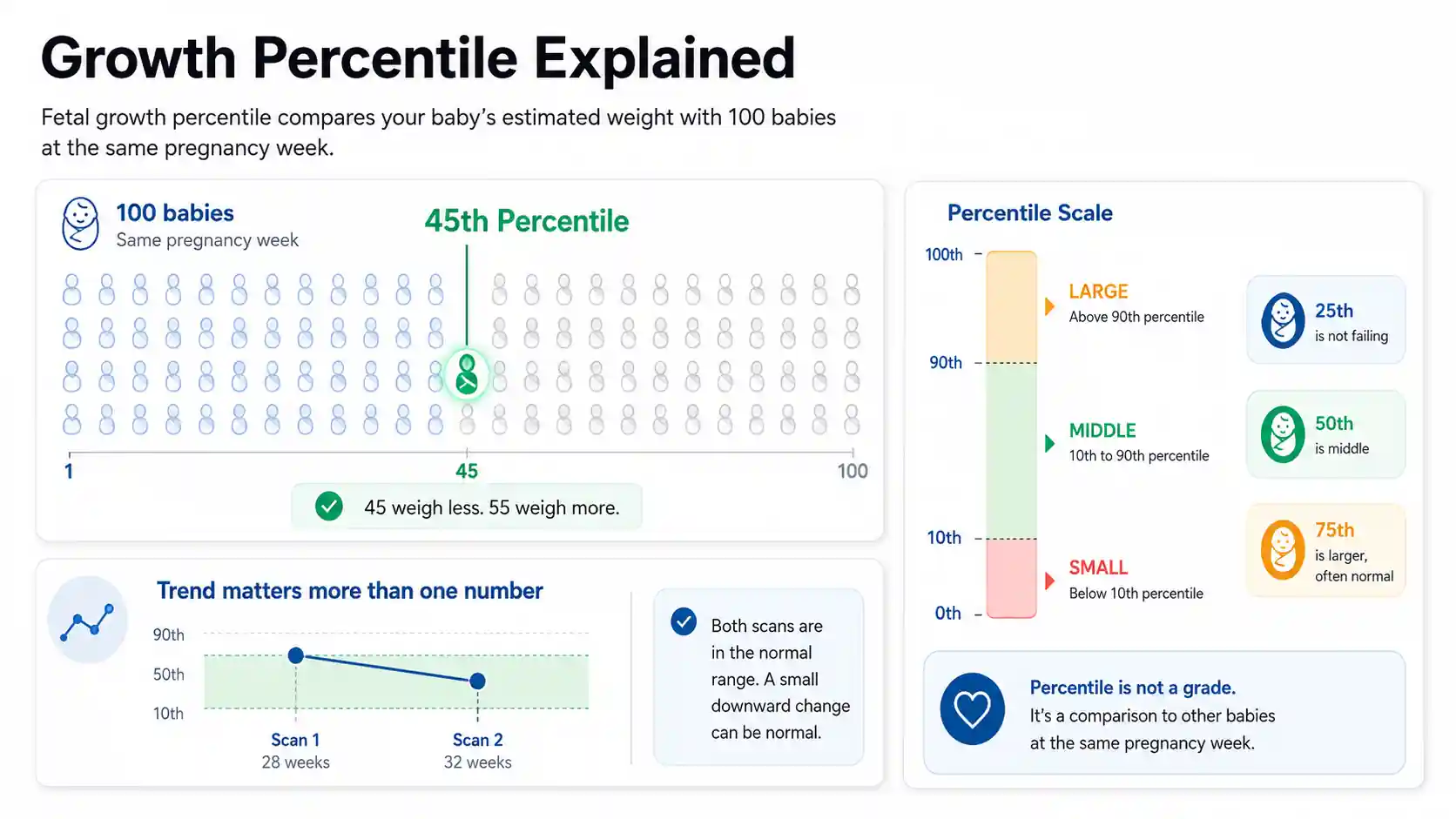
Micro Insight
Fetal growth percentile helps you ask better questions. One number gives context. The growth trend tells the bigger story.
What Is Fetal Growth Percentile?
Fetal growth percentile shows how your baby’s estimated weight compares with babies at the same pregnancy week. A 50th percentile result sits near the middle. A lower number means smaller than many babies that week. A higher number means larger than many babies that week.
Percentile is not a school score. A baby in the 25th percentile is not failing growth. It means 25 out of 100 babies may weigh less at the same pregnancy age.
A 75th percentile baby may simply be bigger by genetics. A 12th percentile baby may also be healthy. The pattern matters more than one scan number.
Say a baby measures in the 45th percentile at 28 weeks. That sits close to the middle. If the next scan drops sharply, your doctor may watch the trend more closely.
What Your Fetal Growth Percentile Means
Your fetal growth percentile shows where your baby’s estimated weight sits for the pregnancy week you entered. A 50th percentile result is near the middle. Below the 10th percentile is usually classed as small for gestational age. Above the 90th percentile is usually classed as large for gestational age.
Understanding Your Result
This result is a comparison, not a grade.
A 42nd percentile result means your baby’s estimated weight is higher than about 42 out of 100 babies at the same pregnancy week. It also means about 58 out of 100 may weigh more.
Your scan result matters because it gives your doctor a growth clue. Still, one scan does not tell the full story. Weight estimates can vary, and trends often matter more than one number.
Is Your Result Good or Bad?
In most cases, the 10th to 90th percentile range is treated as the usual growth range.
Below the 10th percentile may need closer review. It does not always mean fetal growth restriction. Some babies are naturally smaller and healthy.
Above the 90th percentile may mean your baby is measuring larger than expected. Your provider may look at growth trend, glucose screening, fluid level, and delivery planning.
What You Should Do Next
- Check that your pregnancy week and scan date match.
- Make sure you used the right unit, such as mm, cm, grams, or lbs.
- Ask your doctor if the result changed a lot since the last scan.
- For a low result, ask about Doppler checks, fluid level, and repeat scan timing.
Example Interpretation
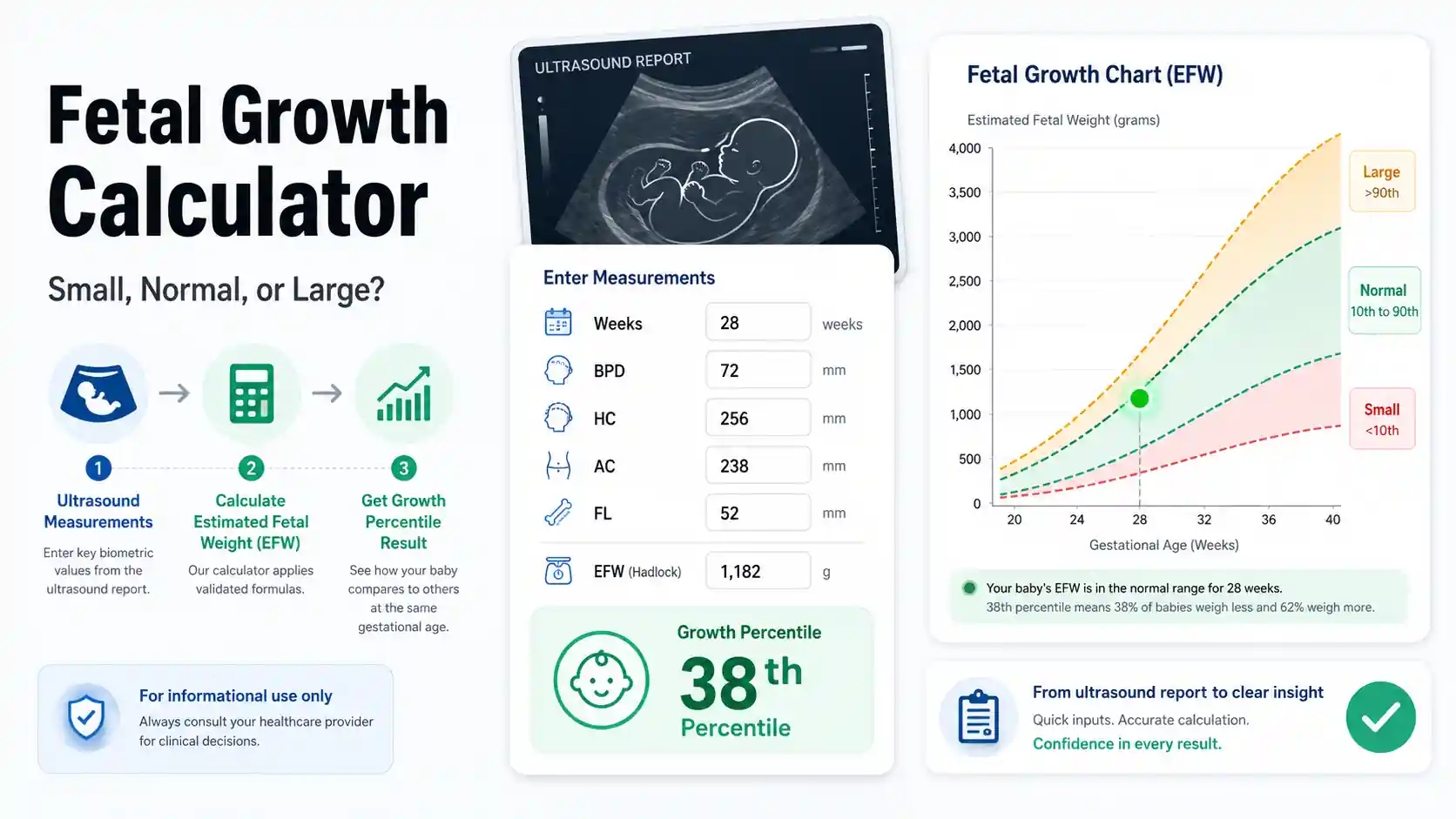
Use this quick test in the calculator:
- Pregnancy type: Singleton
- Growth reference: Hadlock IV
- Gestational age: 28 weeks 0 days
- Mode: Direct estimated weight
- Estimated fetal weight: 1,182g
The calculator gives about 42nd percentile.
That sits inside the usual range. It suggests the baby’s estimated weight is near the middle for 28 weeks. Keep the result as scan context. Compare it with the next growth scan, not just one reading.
Which Fetal Growth Standard Should You Use?
Choose the standard that matches your scan report, clinic, or doctor’s chart. Hadlock is the safest default when the report does not name a method. NICHD, WHO, FMF, and twin mode should be used only when they fit your pregnancy context. NICHD is singleton-focused, while WHO charts use multinational growth data.
| Option | Best For | What It Changes | Use With Care | Notes |
|---|---|---|---|---|
| Hadlock IV | Default | General ultrasound EFW from BPD, HC, AC, and FL. | Use when your report does not name a chart. | Best base option for most standard growth scan reports. |
| FMF-style | Fetal Medicine | Raises the expected mean weight slightly. | Use when your clinic follows fetal medicine style references. | This is an adjustment, not a full FMF clinical chart. |
| NICHD-style | USA | Lowers the expected mean weight slightly. | Best for U.S. users comparing singleton growth context. | NICHD’s official tools use their own study data model. |
| WHO / OMS-style | Global | Lowers the expected mean weight more than NICHD-style. | Useful for WHO, global, India, or OMS-related searches. | WHO charts come from multinational fetal growth data. |
| Twins Mode | Twins | Adjusts expected weight after 28 weeks. | Do not treat it as a full twin-specific growth chart. | Use only when the pregnancy type is twins. |
Heads-up: This calculator uses reference adjustments only. It does not load full FMF, NICHD, WHO, INTERGROWTH, or Barcelona chart datasets.
How to Use the Fetal Growth Calculator
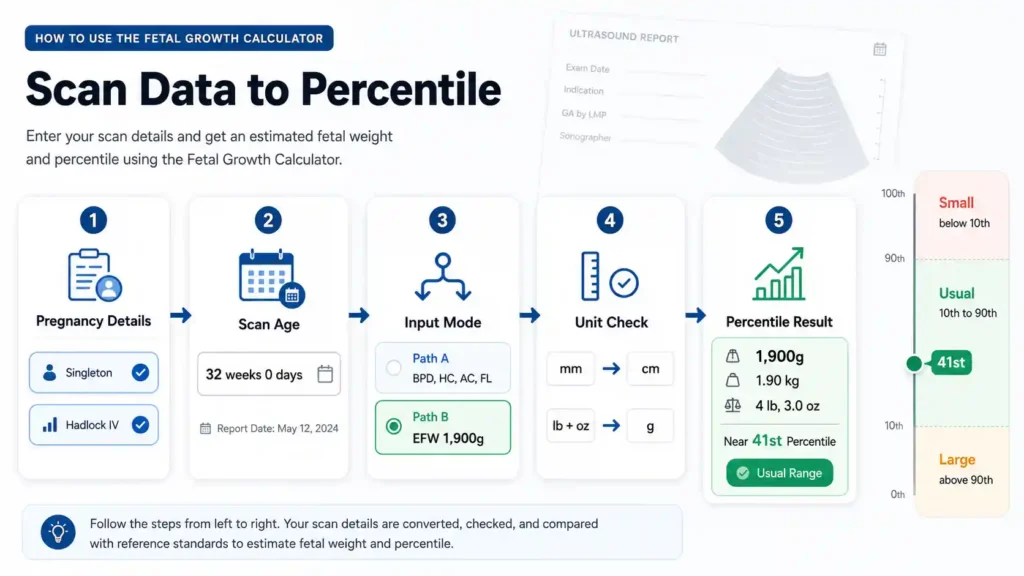
Use this section to understand what happens inside the tool. The Fetal Growth Calculator takes your scan age and fetal weight data, then turns them into an estimated growth percentile.
Select Pregnancy Details
Choose singleton or twins, then pick the growth reference that best matches your scan report. The tool uses this choice to set the expected weight curve. Twin mode also adjusts the expected weight after 28 weeks, because twin growth often tracks differently later in pregnancy.
Enter Scan Age
Add the exact weeks and days from the ultrasound date. This matters because fetal weight changes fast during pregnancy. A few days can shift the expected weight curve, so use the age written on the scan report whenever possible.
Choose Input Mode
Pick measurement mode if your report lists BPD, HC, AC, and FL. The tool uses those scan measurements to estimate fetal weight. Choose direct weight mode if your report already gives EFW in grams or pounds and ounces.
Run the Calculator
The tool checks your inputs and converts units when needed. Millimeters become centimeters for scan measurements. Pounds and ounces become grams. Then it compares your baby’s estimated weight with the expected weight for that same pregnancy week.
Read the Percentile
Your result shows the estimated weight, kg value, pounds and ounces, percentile, and growth label. Below 10th is small for gestational age. The 10th to 90th range is usually treated as the expected range. Above 90th is large for gestational age.
Quick Example to Test
Try these sample numbers in the calculator:
- Pregnancy Type: Singleton
- Growth Reference: Hadlock IV
- Input Mode: I already have the Estimated Weight
- Gestational Age: 32 weeks 0 days
- Estimated Weight: 1,900g
Result:
Your estimated fetal weight is 1,900g, or 1.90 kg. That is about 4 lb, 3.0 oz.
The calculator places this result near the 41st percentile.
This sits inside the usual 10th to 90th percentile range. In plain words, this estimated weight looks within the expected range for 32 weeks.
Now enter your own scan values and check whether your baby’s estimated growth sits low, middle, or high for the week selected.
How the Fetal Growth Calculator System Works
The Fetal Growth Calculator uses scan age and fetal weight data to estimate growth percentile. Measurement mode uses BPD, HC, AC, and FL. Direct mode uses the EFW from your report. The system then compares that weight with an expected range for the selected week.
Key Features & Benefits
- Supports BPD, HC, AC, and FL ultrasound measurements.
- Converts mm to cm before running measurement-based weight logic.
- Accepts direct EFW in grams or pounds and ounces.
- Compares estimated fetal weight with the selected pregnancy week.
- Shows small, usual, or large growth context without panic wording.
Technical Process
Input Capture
The system reads pregnancy type, growth reference, scan age, input mode, and fetal weight data before checking for missing or unusual values.
Logic Processing
Measurement mode estimates fetal weight from scan values, while direct mode converts the entered EFW into grams for comparison.
Result Output
The system returns fetal weight, unit conversions, percentile, and growth label so the user can understand the scan result faster.
How the Fetal Growth Calculator Formula Works (Complete Breakdown)
The Fetal Growth Calculator uses two formula paths. If you enter BPD, HC, AC, and FL, it estimates fetal weight with a Hadlock 4-style equation. If you enter EFW directly, it converts that weight into grams and compares it with the expected weight for your selected pregnancy week.
Formula
					log10EFW =
1.3596
- (0.00386 × AC × FL)
+ (0.0064 × HC)
+ (0.00061 × BPD × AC)
+ (0.0424 × AC)
+ (0.174 × FL)

EFW in grams = 10 ^ log10EFW
Direct Weight Formula
					finalGrams = entered grams

finalGrams = (lbs × 453.592) + (oz × 28.3495)
Percentile Formula Logic
					totalWeeks = weeks + (days ÷ 7)

expectedLn =
0.578
+ (0.332 × totalWeeks)
- (0.00354 × totalWeeks²)

expectedMeanGrams = e ^ expectedLn

SD = expectedMeanGrams × 0.12

zScore = (finalGrams - expectedMeanGrams) ÷ SD

percentile = rounded normal curve position from zScore
What the Formula Does
The first formula estimates fetal weight from ultrasound measurements. It uses head size, belly size, and femur length to calculate EFW in grams.
The second formula handles reports that already show fetal weight. It keeps grams as they are or converts pounds and ounces into grams.
After that, the calculator compares fetal weight with the expected weight for the selected week. This comparison creates the percentile and growth label.
Key Variables Used in the Formula
BPD
BPD means biparietal diameter. It measures the width of the baby’s head from side to side. The calculator uses this value in centimeters when estimating fetal weight from scan measurements.
HC
HC means head circumference. It measures around the baby’s head. This value helps the formula understand head growth and improves the fetal weight estimate when used with belly and femur measurements.
AC
AC means abdominal circumference. It measures around the baby’s belly. This is one of the most important fetal growth measurements because belly size often changes with weight gain.
FL
FL means femur length. It measures the baby’s thigh bone. The calculator uses it with AC, HC, and BPD to estimate fetal weight more closely from ultrasound data.
EFW
EFW means estimated fetal weight. In this calculator, EFW becomes the main weight value. It may come from the Hadlock formula or directly from your ultrasound report.
totalWeeks
totalWeeks turns weeks and days into one pregnancy age value. For example, 24 weeks and 3 days becomes 24.43 weeks. This helps the calculator compare weight with the correct scan age.
expectedMeanGrams
expectedMeanGrams is the model’s expected fetal weight for the week selected. The calculator uses this as the middle reference point before calculating percentile.
SD
SD is the spread around the expected weight. This calculator sets it as 12% of the expected mean. It helps measure how far the baby’s weight sits from the middle.
zScore
zScore shows how far the entered or calculated fetal weight sits from the expected mean. A lower zScore moves the percentile down. A higher zScore moves it up.
Percentile
Percentile shows the baby’s estimated weight position from 1 to 99. It turns the weight comparison into a simpler growth result that is easier to read.
Another Example Calculation
Let’s test the measurement formula with a new scan example. These values match the calculator’s biometry mode.
Given:
- Pregnancy Type = Singleton
- Growth Reference = Hadlock IV
- Gestational Age = 24 weeks 0 days
- BPD = 60 mm
- HC = 220 mm
- AC = 195 mm
- FL = 42 mm
Unit Conversion
					BPD = 6.0 cm
HC = 22.0 cm
AC = 19.5 cm
FL = 4.2 cm
Calculation:
					log10EFW =
1.3596
- (0.00386 × 19.5 × 4.2)
+ (0.0064 × 22.0)
+ (0.00061 × 6.0 × 19.5)
+ (0.0424 × 19.5)
+ (0.174 × 4.2)

log10EFW = 2.813236

EFW = 10 ^ 2.813236

EFW = 650.48g
Result:
- Estimated Fetal Weight = 650g
- Kilograms = 0.65 kg
- Pounds and Ounces = 1 lb, 6.9 oz
- Percentile = 41st
- Growth Label = Appropriate for Gestational Age
Meaning:
This result sits inside the usual 10th to 90th percentile range. It suggests the estimated weight is close to the middle for 24 weeks. The next scan matters too, because growth trend gives better context than one result.
How do you calculate Fetal Growth?
You calculate fetal growth by comparing estimated fetal weight with the expected weight for the same pregnancy week. This calculator either estimates weight from BPD, HC, AC, and FL or uses the EFW from your report. Then it shows the percentile and growth range.
What does BPD 65, HC 240, AC 215, and FL 48 mean at 26 weeks?
This example uses full ultrasound measurements in millimeters.
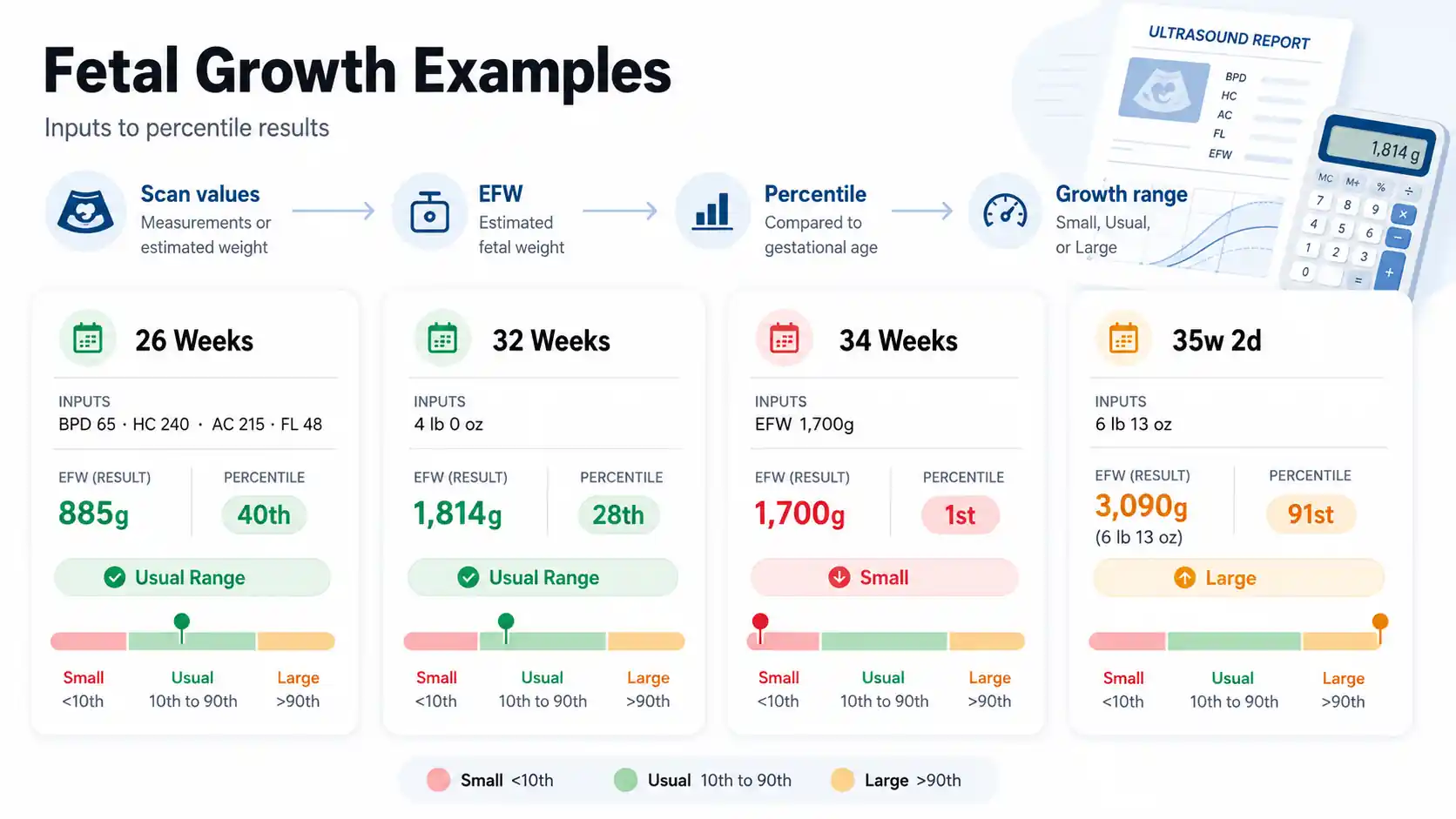
Input Values
- Pregnancy type: Singleton
- Growth reference: Hadlock IV
- Gestational age: 26 weeks 0 days
- Input mode: Measurements
- BPD: 65 mm
- HC: 240 mm
- AC: 215 mm
- FL: 48 mm
Process
The calculator converts the values into centimeters, then estimates fetal weight from the scan measurements.
Result
- Estimated fetal weight: 885g
- Kilograms: 0.88 kg
- Pounds and ounces: 1 lb, 15.2 oz
- Percentile: 40th
- Growth label: Appropriate for Gestational Age
Meaning
This result sits inside the usual 10th to 90th range. It suggests the baby’s estimated weight is near the middle for 26 weeks.
Is 4 lb at 32 weeks normal?
This example matches a common growth scan question.
Input
- Pregnancy type: Singleton
- Growth reference: Hadlock IV
- Gestational age: 32 weeks 0 days
- Input mode: Direct estimated weight
- Weight unit: lbs / oz
- Pounds: 4
- Ounces: 0
Process
The calculator converts 4 lb into grams, then compares that weight with the expected weight for 32 weeks.
Result
- Estimated fetal weight: 1,814g
- Kilograms: 1.81 kg
- Pounds and ounces: 4 lb, 0.0 oz
- Percentile: 28th
- Growth label: Appropriate for Gestational Age
Meaning
This result falls inside the usual range. It is not low by this calculator’s logic, but your doctor may still compare it with your full scan report.
What does 1,700g at 34 weeks mean?
This example checks a lower-weight scan result.
Input
- Pregnancy type: Singleton
- Growth reference: Hadlock IV
- Gestational age: 34 weeks 0 days
- Input mode: Direct estimated weight
- Estimated weight: 1,700g
Process
The calculator uses 1,700g as the final fetal weight, then compares it with the expected weight at 34 weeks.
Result
- Estimated fetal weight: 1,700g
- Kilograms: 1.70 kg
- Pounds and ounces: 3 lb, 12.0 oz
- Percentile: 1st
- Growth label: Small for Gestational Age
Meaning
This result is below the 10th percentile. It does not diagnose a problem, but it is worth discussing with your provider.
What if baby measures 6 lb 13 oz at 35 weeks and 2 days?
This example checks a higher-weight scan result.
Input
- Pregnancy type: Singleton
- Growth reference: Hadlock IV
- Gestational age: 35 weeks 2 days
- Input mode: Direct estimated weight
- Pounds: 6
- Ounces: 13
Process
The calculator converts pounds and ounces into grams, then checks the result against the expected weight for 35 weeks and 2 days.
Result
- Estimated fetal weight: 3,090g
- Kilograms: 3.09 kg
- Pounds and ounces: 6 lb, 13.0 oz
- Percentile: 91st
- Growth label: Large for Gestational Age
Meaning
This result sits just above the 90th percentile. Your provider may look at growth trend, glucose screening, fluid level, and delivery planning.
Quick Rules to Remember
Use the same scan date, unit, and pregnancy week shown on your ultrasound report. A single percentile gives a snapshot. The next scan shows whether the growth pattern is steady, rising, or dropping.
Which Fetal Growth Range should you use?
Use the percentile range that matches the calculator result. This table follows the calculator logic: below 10th is SGA, 10th to 90th is AGA, and above 90th is LGA. These cutoffs also match common clinical language around fetal growth review.
| Range | Label | Clinical Meaning | What to Ask | Notes |
|---|---|---|---|---|
| Below 10th | SGA | Baby is measuring smaller than the usual range for that week. | Ask about growth trend, Doppler, fluid level, and repeat scan timing. | A low percentile needs review, but it is not a diagnosis by itself. |
| 10th to 90th | AGA | Baby is inside the calculator’s usual growth range. | Compare this result with your next scan to check the pattern. | This is usually a reassuring range when the full scan also looks normal. |
| Above 90th | LGA | Baby is measuring larger than the usual range for that week. | Ask about growth trend, glucose screening, fluid level, and birth planning. | A high percentile may be normal, but your provider should review context. |
Heads-up: This table matches the calculator logic. It helps you read the result, but your doctor should review scan trends, health history, and the full ultrasound report.
What to Do After Using the Fetal Growth Calculator
A fetal growth result is useful when it leads to the right next question. Low, usual, and high percentiles each need a different response. Use your result to check your scan details, track the pattern, and prepare smarter questions for your provider.
For Low Results
Below the 10th percentile needs calm follow-up. Some babies are naturally small. Others need closer growth review because the placenta, fluid level, or blood flow may need checking.
Bring your full ultrasound report to your next visit. Ask about abdominal circumference, Doppler flow, amniotic fluid, and when another growth scan should happen.
Double-check the basics before you worry. A wrong scan week, missed day, or mm/cm mix-up can move the percentile more than expected.
For Usual Range Results
A result between the 10th and 90th percentile usually sits inside the expected range. That is a good sign when the rest of the ultrasound also looks steady.
Save this number with the scan date. At the next scan, compare the new percentile with this one. A steady pattern gives better context than a single result.
Ask whether your baby is following their own growth curve. Genetics, dating, scan angle, and measurement quality can all shape the result.
For High Results
Above the 90th percentile points to a larger-than-usual estimate for that week. It may be normal, but the full scan needs context.
Talk with your provider about abdominal circumference, fluid level, glucose screening, and delivery planning. These details matter more when weight and belly size both trend high.
Review the unit entry too. Pounds and ounces can be easy to enter wrong. One small mistake can push the gram value and percentile higher.
For Changing Percentiles
A drop or jump between scans deserves attention, even when both numbers stay in range. The pattern helps your provider see whether growth is steady or shifting.
Compare results from the same chart style when possible. Switching between Hadlock, FMF-style, NICHD-style, or WHO/OMS-style can make the trend look different.
Write down the scan date, gestational age, EFW, and percentile each time. That simple log makes your next appointment clearer.
What if you want to track growth speed?
This calculator checks your baby’s current estimated weight percentile. It does not measure fetal growth velocity between two scans.
Growth velocity looks at how fast weight changes over time. Ask your provider about growth speed if your baby’s percentile drops, rises sharply, or your scan reports show repeated growth checks.
When should you call your doctor about fetal growth?
Call your doctor or maternity unit if you notice reduced baby movement, leaking fluid, severe pain, bleeding, or your provider already flagged low fluid, abnormal Doppler, or a sharp growth drop. A calculator cannot judge urgent symptoms.
For low or high percentile results, use the calculator result to ask better questions. For symptoms or urgent changes, contact your care team.
You Might Also Find These Helpful
Pregnancy & Fertility 45
One Time Pregnancy Calculator estimates pregnancy odds from one encounter, plus fertile window timing, test date, due date, and 21-day testing guidance.
Try calculatorUse the AMH Calculator to convert ng/mL or pmol/L, compare your result with age-based data, and see what it may mean for IVF, fertility,…
Try calculatorUse the Baby Eye Color Calculator with parents, grandparents, or sibling context to compare Brown, Green/Hazel, and Blue/Grey model estimates instantly.
Try calculatorBasal Body Temperature Calculator checks reading conditions and analyzes your temperature pattern for a sustained shift that may be consistent with ovulation.
Try calculatorBPD gestational age calculator: estimate fetal age from BPD, compare your week, check normal BPD ranges, and understand ahead or behind results.
Try calculatorCalculate odds with the Chance of Twins Calculator. Enter maternal age and history. Find your probability instantly. See if you will conceive multiples now.
Try calculatorFind out exactly when you conceived. Our free Conception Calculator uses your Due Date, LMP, or Ultrasound to estimate your fertilization date and fertile…
Try calculatorUse our Conception Date Due Date Calculator to find your baby's arrival date. Enter your conception or intercourse date for clinical 40-week results.
Try calculatorContraceptive effectiveness calculator to compare birth control methods, typical vs perfect use, backup protection, and 5-year pregnancy risk.
Try calculatorUse this CRL calculator to estimate gestational age and due date from crown-rump length in mm or cm. Compare CRL, LMP, and IVF dating…
Try calculatorEstimate your monthly and 12-month pregnancy odds by age, partner age, and cycle dates. See your fertile window and when to seek fertility help.
Try calculatorUse this fundal height calculator to compare your cm measurement by week, check growth range, estimate baby weight, and know when to ask about…
Try calculatorCommon Mistakes When Using the Fetal Growth Calculator
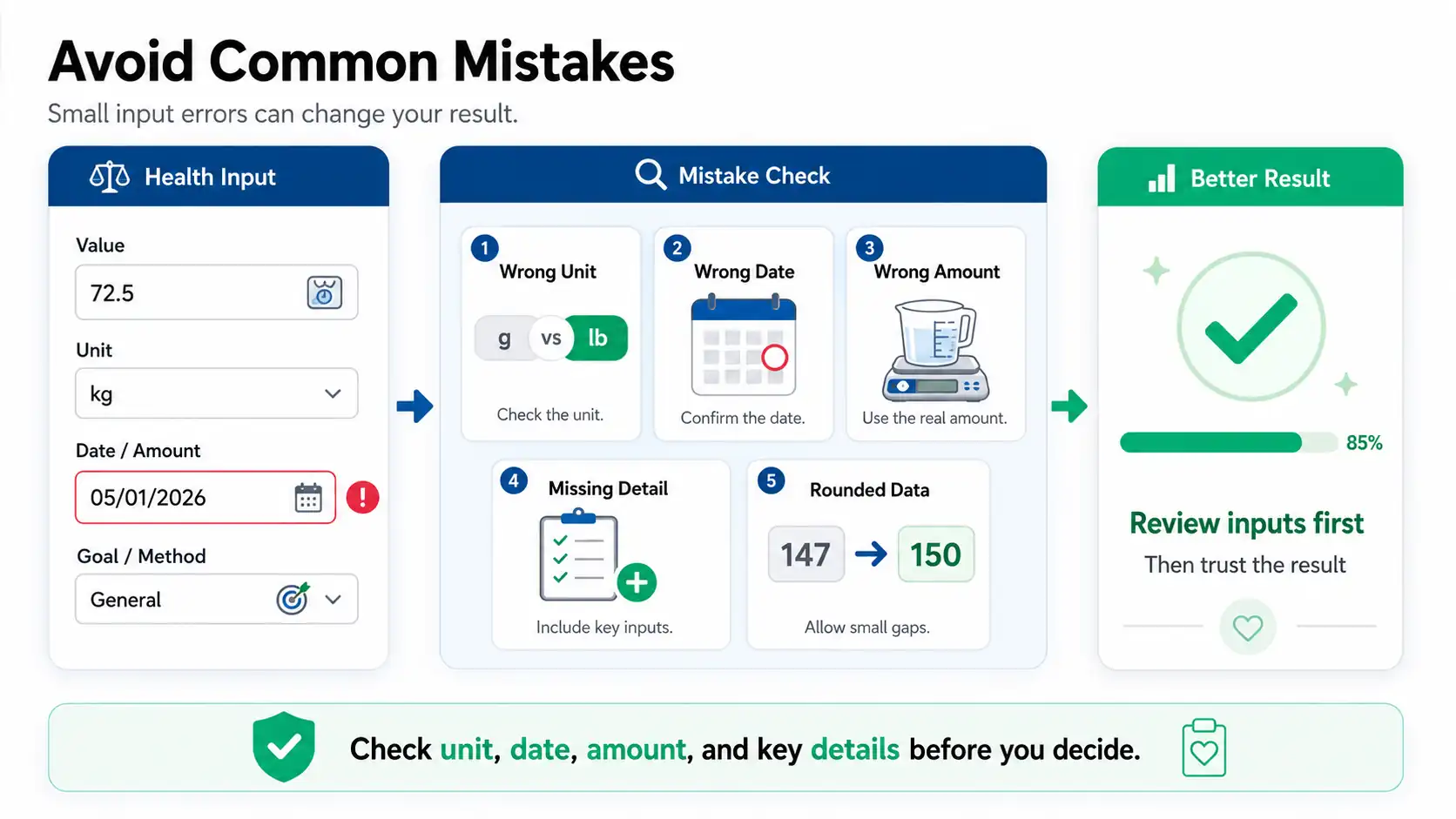
Fetal growth results can look wrong when the scan age, units, or input mode do not match the report. Most errors come from mixing mm and cm, using an old scan date, or treating EFW like a final birth weight.
- Entering BPD, HC, AC, or FL in mm while the calculator is set to cm
- Using pregnancy weeks from today instead of the gestational age on the ultrasound report
- Entering EFW in the measurement fields instead of using direct weight mode
- Treating estimated fetal weight as the baby’s final birth weight
- Comparing singleton, twin, Hadlock, NICHD-style, and WHO/OMS-style results as if they use the same reference path
Frequently Asked Questions (FAQs)
How Accurate is a Fetal Growth Calculator?
A fetal growth calculator gives an estimate, not an exact baby weight. Ultrasound weight can shift because of baby position, scan angle, measurement quality, and the formula used. Treat the result as growth context. Your doctor should compare it with the full scan report and future scans.
Can a Fetal Growth Percentile change between scans?
Yes. Fetal growth percentile can move between scans because babies grow in spurts and ultrasound measurements can vary. A drop or jump is not always a problem. Your provider usually looks at the pattern, scan quality, fluid level, and whether the result crosses key ranges.
Is below the 10th percentile always Fetal Growth Restriction?
No. Below the 10th percentile may mean the baby is small for gestational age, but it does not always mean fetal growth restriction. Some babies are naturally small. Doctors look at blood flow, fluid level, placenta health, and repeat growth scans before deciding what it means.
Is above the 90th percentile always a problem?
No. Above the 90th percentile means the estimated weight is larger than most babies at that week. Some babies are just genetically larger. Your doctor may review abdominal circumference, glucose screening, fluid level, and delivery planning if the high result continues.
What is the difference between EFW and fetal percentile?
EFW is the estimated fetal weight from your scan. Fetal percentile shows how that weight compares with babies at the same pregnancy week. A baby can have an EFW in grams or pounds, while the percentile tells you whether that weight looks low, usual, or high.
Should I use BPD, HC, AC, FL, or the EFW from my report?
Use BPD, HC, AC, and FL if your report lists all four measurements and you want the tool to estimate weight. Use direct EFW mode if your report already gives estimated fetal weight. Do not enter EFW into the measurement fields.
Why do Different Fetal Growth Calculators Give Different Results?
Different Fetal Growth Calculators may use different formulas, charts, or reference datasets. Hadlock, NICHD, WHO, FMF-style, and twin charts do not always produce the same percentile. Use the same method when comparing results across scans.
Does 4 lb at 32 weeks mean my baby is too big?
Not always. Four pounds at 32 weeks may still fall inside the usual range, depending on the chart and exact gestational age. The percentile matters more than weight alone. Your provider should compare the result with your scan details and growth history.
Can fetal weight on ultrasound be different from birth weight?
Yes. Ultrasound fetal weight can differ from birth weight, especially later in pregnancy. EFW depends on measurements, formula choice, and baby position. Use it as a helpful estimate, not a promise of what the baby will weigh at delivery.
Which fetal growth standard should I choose?
Choose the standard that matches your scan report or clinic. Hadlock is a good default when no method is named. Use NICHD-style, WHO/OMS-style, FMF-style, or twins mode only when that choice fits your report, country, clinic, or pregnancy type.
Why is AC percentile different from EFW percentile?
AC percentile looks only at belly size. EFW percentile estimates total baby weight from several scan measurements or direct EFW. These numbers can differ on the same report. Your provider looks at the full pattern, not one measurement alone.
Can fundal height and ultrasound percentile be different?
Yes. Fundal height measures belly size from the outside, while ultrasound estimates fetal weight from scan measurements. They can differ because of baby position, body type, fluid level, or dating. An ultrasound growth scan gives more detail when fundal height raises a concern.
Questions?
We had love to hear from you! Whether you are reporting an issue, suggesting a new calculator, or exploring collaboration opportunities — we are here to help. Every message helps us make 100calc smarter, faster, and more helpful for everyone.
Why People Trust 100calc
At 100calc.com, we focus on accuracy, speed, and trust. Every calculator we create is designed to give reliable, instant, and easy-to-understand results you can truly depend on.